How to Enable Authenticator App 2FA in Roblox
Your Roblox account is your digital home—filled with hard-earned items, Robux, and memories. The first and most important step to lock the door against scammers is setting up Two-Factor Authentication (2FA) with an authenticator app. This method is widely considered the best balance of security and convenience, creating a vital second wall of defense beyond your password. Here’s exactly how to get it done.
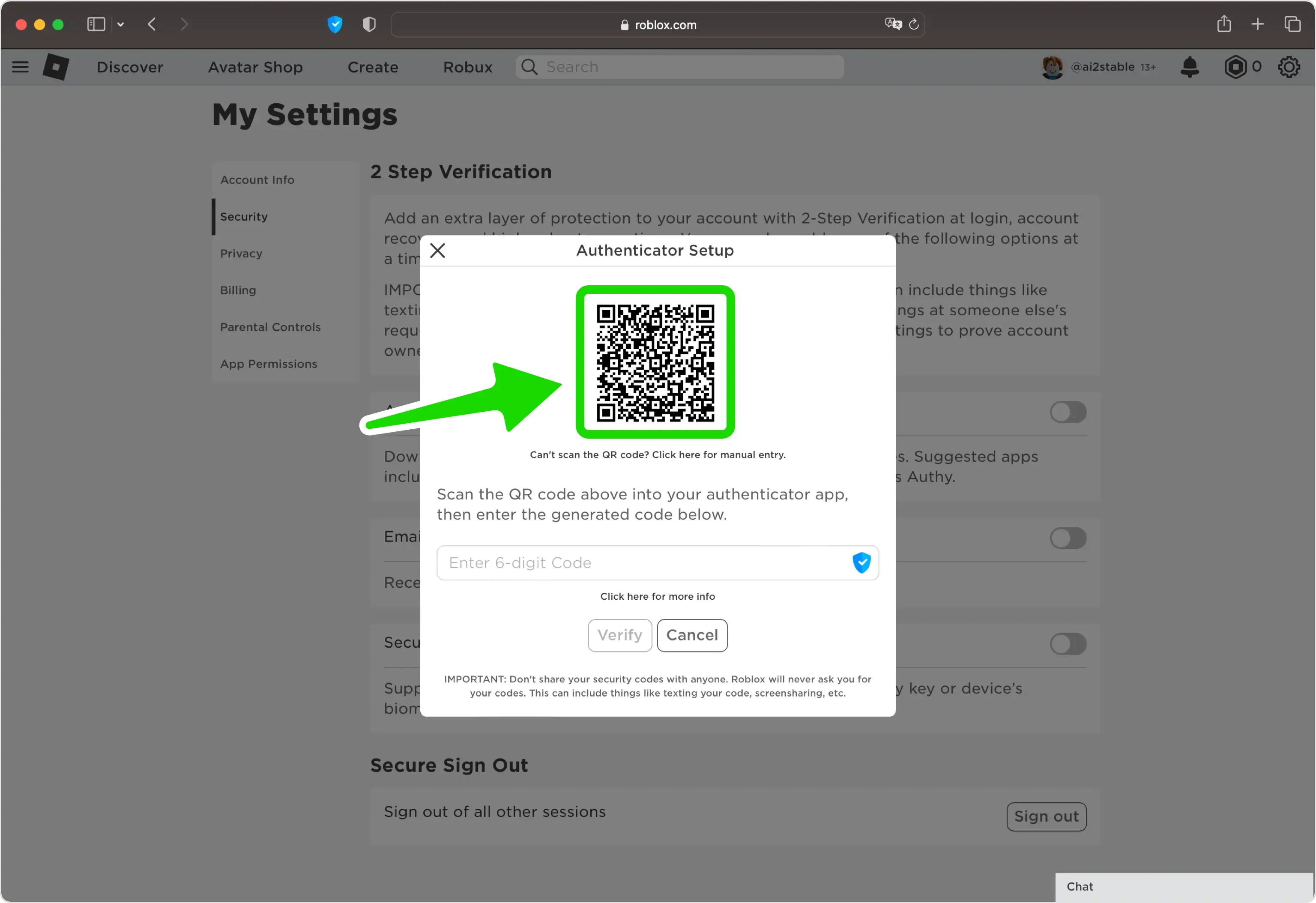
Starting the 2-step verification process in Roblox.
First, you’ll need the app itself. Download a trusted Authenticator App from the Apple App Store or Google Play Store. Apps like Google Authenticator, Microsoft Authenticator, or Authy work perfectly. Install it on your phone—this will be your primary 2FA device for generating secure, time-sensitive codes.
Next, head to the Roblox website and log into your account. In the top-right corner, click the gear icon and select Settings from the dropdown menu. This is your account's control center. From here, navigate to the Security tab. You’ll find all the major security options here, including the one you need.
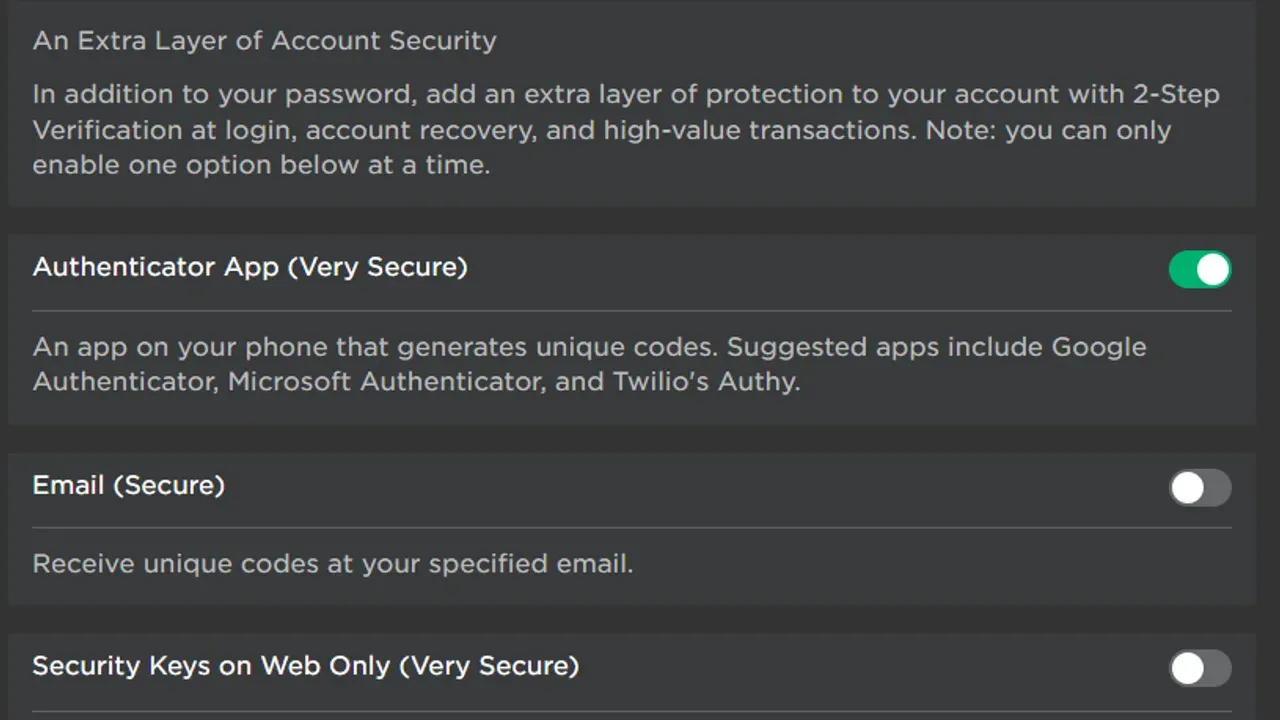
In the Security tab, look for the toggle switch labeled Authenticator App (Very Secure). Click this toggle to begin the setup process. A new screen will appear with a QR code and a Secret Key—this is the digital handshake that links your Roblox account to your phone.
If your phone's camera has trouble scanning the on-screen QR code, you can use the Manual Entry option instead. Simply type the provided Secret Key directly into your authenticator app.
Now, grab your phone. Open your Authenticator App and tap the '+' button to add a new account. Use your phone's camera to scan the QR code displayed on your computer screen. The app will automatically detect your Roblox account details and save the entry. If you used the manual method, you’d enter the secret key here.
The final step happens back on the Roblox website. Your authenticator app will now show a rotating, six-digit code for your Roblox account. Return to the setup page on the Security tab, enter this 6-digit OTP code into the verification field, and click Verify.
Once you see the confirmation, you’re all set. From now on, every time you log into Roblox, you’ll need to open your authenticator app and enter the current six-digit code. It adds just a few seconds to your login but creates a massive barrier for anyone trying to steal your account. With this foundational security in place, your digital world is now significantly safer.
How to Use Hardware Security Keys and Passkeys in Roblox
Forget password entry and typing in one-time codes from an app. In Roblox, the ultimate security upgrade is moving beyond those entirely to the realm of physical hardware and biometric locks. Think of hardware security keys and passkeys as equipping your account with a digital Fort Knox—they shift protection from something you remember (a password) or something you have digitally (an authenticator app) to something you physically possess or something you are.
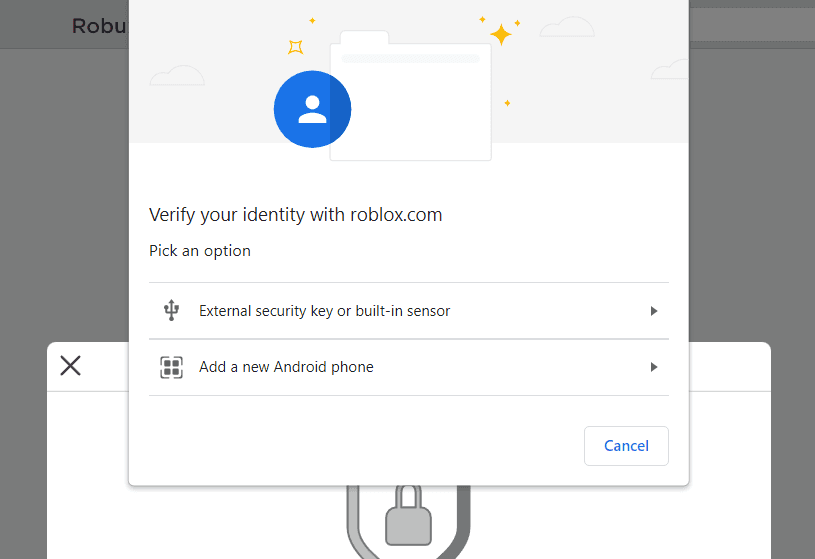
Users can choose between physical keys or built-in biometric sensors for passkey verification.
Here’s the trick most guides miss: to even get started with this top-tier security, you need a foundation. Before you can register a physical key or a biometric passkey in Roblox, you must first have Authenticator 2FA enabled. Head to Account Settings, then the Security tab, and make sure that toggle is active. This is a non-negotiable prerequisite because these advanced methods are currently supported on web browsers and a limited set of devices. Roblox requires the authenticator app as a reliable backup method to ensure you’re never locked out.
Setting Up Your Physical Key
Once your authenticator app is humming, you’re ready to add the gold standard: a FIDO2-compliant Hardware Security Key, like a YubiKey. Go back to the Security tab in your account settings and find the Security Keys option. Toggle it on, and your browser will walk you through the registration process. You’ll be prompted to insert your key into a USB port and touch its sensor to confirm it’s really you. A crucial final step is to assign a nickname to your key (like “Blue YubiKey” or “Home PC”). This helps immensely if you register multiple keys later.
Now, when logging in on a browser, after entering your password, click Verify. Instead of being asked for an authenticator code, your browser will prompt you to present your physical key. Insert it, touch it, and you’re in. This method is considered the most secure because a hacker needs to physically steal your specific key to even attempt a breach.
Keep your hardware key in a safe, memorable place. It’s a tiny device, but losing it means you’ll need to use your backup authenticator app to log in and remove the lost key from your settings.
The Convenience of Passkeys
If carrying a physical key isn’t your style, Roblox also supports Passkeys. This is a passwordless login method that uses your device's own built-in security. Think of it as using your phone or laptop's lock screen to prove your identity. To set one up, navigate to Account Info within your settings, then go to Login Methods. Click Add Passkey, and your device will guide you through creating one using FaceID, TouchID, or your numeric screen lock.
The beauty of passkeys is in their simplicity and cross-device magic. Once saved to your iCloud or Google account, you can use a passkey stored on your phone to log into Roblox on your computer. This Cross-Device Login feature is perfect for authorizing a session on your Xbox or a friend's PC without ever typing a password.
Here’s the best part for those who find 2SV a hassle: using a passkey completely bypasses the standard 2-Step Verification challenge. When you log in with a passkey, Roblox doesn’t ask for an extra code. Why? Because successfully using your FaceID or unlocking your device is proof enough of your physical possession, which fulfills the core security principle of 2SV. It’s both more secure and more convenient.
⚠️ Important: Only add passkeys to devices you personally own and control. Never set one up on a shared family computer or a public device, as anyone who can unlock that device can access your Roblox account.
Managing Your Digital Keys
Life happens—you might lose a hardware key or sell an old phone. Managing these methods is easy. In the same Account Info > Login Methods area, you can view all your registered passkeys and security keys. To remove one, simply click the trashcan icon next to it. You’ll likely need to confirm your identity with your password or an email code to complete the removal. Remember, if you remove a passkey from Roblox, you might also need to delete it from your device’s own system settings (like your iPhone's Passwords menu) to stop it from appearing as an option.
With a hardware key in your pocket or a passkey on your devices, you’ve moved your Roblox account’s security from robust to nearly impenetrable. You’re no longer just a password away from being compromised.
Common Social Engineering Scams Targeting Roblox Players
This is where the real fight happens—not in a Roblox experience, but in your own mind. Scammers, often called beamers, don't need to be elite hackers; they just need to be master manipulators. In Roblox, they exploit curiosity, fear, and the desire for status to trick you into handing over your account. Understanding their psychological playbook is your strongest shield.
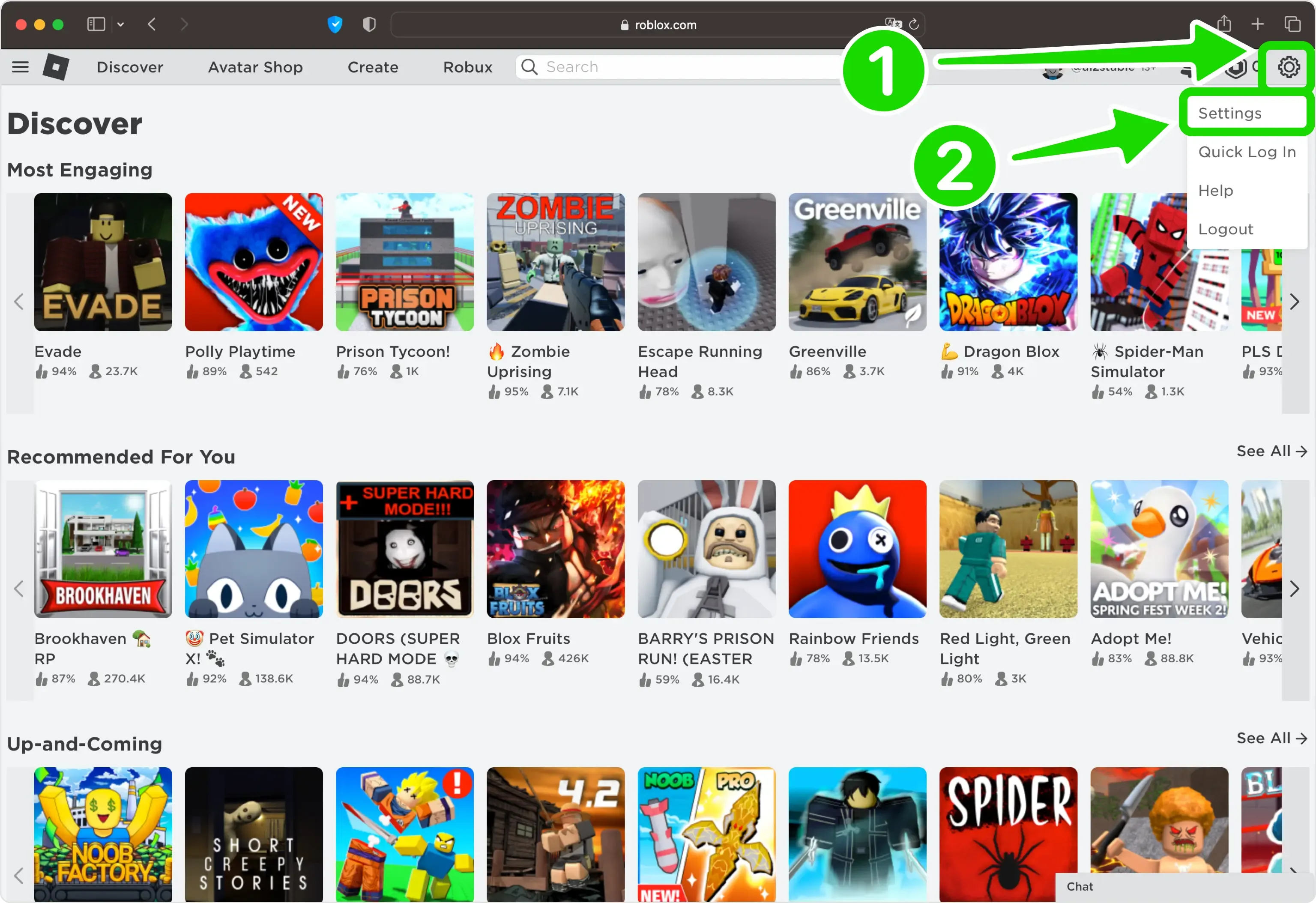
Navigating to Roblox security settings to secure an account.
Let’s break down their most common social engineering traps so you can spot them a mile away.
The Bait: Free Robux & Fake Giveaways
The most pervasive scam is the Free Robux Generator or Milestone Event Giveaway. You’ve seen the spam in public chats or on social media: a site promises thousands of Robux for "verifying" your account. The process is always the same: you [Input] your Roblox Username, [Watch] a fake loading bar, and then are told to [Complete] 'Verification' tasks like surveys, app installs, or joining a Discord server.
Legitimate Robux only comes from Roblox itself—through purchase, gift cards, or official creator programs. Any third-party site, no matter how polished, is a scam designed to profit from you, not give to you.
These Milestone Event Giveaway pages are particularly sneaky, using official-looking Roblox branding and fonts to promise massive payouts (like "5,000 Robux to every player!") if you just log in. This is pure phishing: the moment you enter your password on that fake page, your account is gone.
The Con: Fake Identities & Urgency
Once you take the bait, scammers shift to direct pressure. A common tactic is the Discord 'Staff' Tickets scam. After clicking a link, you’re directed to a Discord server with fake "Support" bots and users with staff roles. They create tickets, mimic official procedures, and tell you that to "claim" your reward or "secure" your account, you must click a verification link (a phishing page) or download a "tool" (malware).
This is where FOMO Pressure kicks in. They’ll use urgent language like, "Your account will be deleted in 10 minutes if you don't verify." This [Trigger] is designed to [Effect] force you into making an impulsive, panicked mistake without thinking it through. Real Roblox support will never pressure you with countdowns.
The Advanced Heist: Trust-Based Theft
Some scams require no password at all, just your trust. The GFX Artist Trap is a classic. A user, pretending to be a graphic artist or developer, offers to create a cool render of your avatar. To do this, they say they need your game files—specifically a .har or .json file from your browser's developer tools. These files contain your active login session cookie. By sending them, you’re literally mailing the scammer the digital key to your account, allowing them to bypass even 2-Step Verification.
The Illusion: Everyone Else is Doing It
To overcome your skepticism, scammers fabricate community approval. Fake Social Proof is everywhere on these scam sites: automated chat feeds that constantly update with messages like "User_ABC just claimed 10,000 Robux! It worked!" This [Visual] trick is meant to [Effect] build false trust and make you think, "If it worked for them, it must be safe for me." It's all automated; you're watching a script designed to convince you.
The core lesson here is that in Roblox, your curiosity is the vulnerability scammers exploit. By recognizing these psychological plays—the too-good-to-be-true offer, the fake authority figure, the manufactured urgency, and the illusion of community trust—you can shut down their entire operation before it starts. If an interaction feels off, it almost certainly is. Walk away, and keep your account safe.
Technical 'Beaming' Methods: Cookie Logging and Phishing
Alright, so you've locked down your account with a strong password and 2FA. You're feeling secure. But in Roblox, there’s a darker, more technical side to account theft that doesn't care about your password at all. We're talking about beaming, where scammers use sophisticated traps to steal the digital keys to your account right from under your nose. Let's break down how it actually works so you can spot—and stop—these attacks before they start.
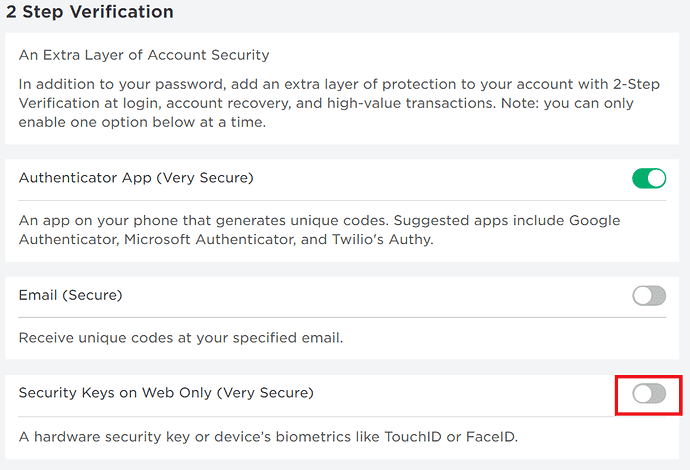
Initiating the security key setup process in Roblox.
The Cookie Heist: Stealing Your Digital Session
The most dangerous form of beaming revolves around stealing your .ROBLOSECURITY cookie. This is a small piece of data your browser stores after you log in, telling Roblox, "Hey, this device is already authorized." If a scammer gets this cookie, they can paste it into their own browser and instantly access your account, bypassing 2FA entirely.
How do they get it? Through clever manipulation. A common trick is the JavaScript URL injection. A scammer might pose as a developer needing help and send you a link that starts with javascript:. They'll ask you to copy and paste this code directly into your browser's address bar and hit enter. This malicious script doesn't take you to a website; instead, it runs a command that quietly sends your active session token straight to the scammer's server.
⚠️ Critical rule: Never, ever paste code you don't understand into your browser's address bar. It’s like handing a stranger the keys to your house.
A similar method is the Bookmark method, where you're asked to drag a special "bookmarklet" to your bookmarks bar and click it, with the same devastating result. Another social engineering favorite is the GFX Artist Trap. Someone offers to make cool art of your avatar but says they need a .har file or .json file from your browser's developer tools. These network files contain your session cookie, and sending them is equivalent to mailing your account away.
Phishing Gets Smarter: Real-Time Validation
You know not to enter your password on fake sites, but what if the fake site acts real? This is real-time phishing. Modern scam pages are connected to Roblox's systems. As you type your password, the page validates it against the real Roblox API instantly. It might show a fake "wrong password" error until you finally type the correct one, confirming to the scammer they have a live, working credential. This makes the fake page feel terrifyingly authentic and bypasses the usual "this looks off" gut check.
Exploiting Trust and System Tools
Scammers also abuse Roblox's own developer tools. In the API form exploit, a scammer will propose an amazing trade. To "verify" your items aren't stolen, they direct you to an official-looking Roblox API testing page (which is real) and give you a specific 'Trade ID'. They tell you to input this ID into the form and click 'Try it out'. Doing this doesn't verify anything—it automatically accepts the scammer's lopsided trade, sending your valuable items their way.
Beyond the Browser: The SIM Swap Threat
Even your phone number isn't safe. In a SIM swapping attack, a determined scammer contacts your mobile carrier, impersonates you, and convinces them to port your phone number to a new SIM card the scammer controls. Once they have your number, they can trigger an SMS-based 2FA login and intercept the code themselves, gaining full access. This is why using an authenticator app or security key for 2FA is always more secure than SMS.
The common thread in all these technical attacks is a request for you to do something unusual: paste a code, download a file, use developer tools, or visit a special test page. If a stranger asks for any of these, it's a trap. Log in only at www.roblox.com, and never share session files or run unknown code.
Understanding these methods strips away the mystery of "beaming." It’s not magic; it's manipulation of both technology and trust. By knowing these traps exist, you can confidently ignore the pressure and keep your account securely in your hands.
Roblox Account Recovery and Post-Scam Security
You’ve clicked the link, entered your details, or installed that “free Robux” tool—and now your Roblox account feels compromised. Don’t panic. This is your immediate action plan to lock down your account, clean up your device, and recover what you can. In Roblox, the moments after a scam are critical; acting fast can mean the difference between a scare and a total loss.
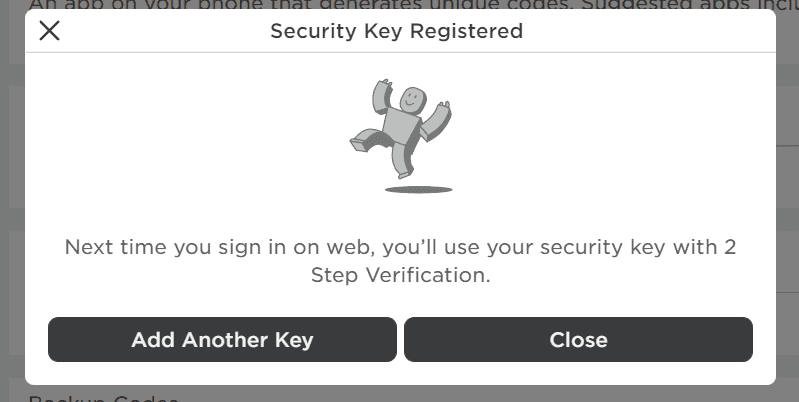
Once enabled, security keys prevent unauthorized logins even if your password is known.
First, isolate and secure your account. Head directly to Roblox.com and click 'Forgot Password'. You’ll need to input the email you verified on your account. This triggers a reset link to that email—use it immediately to change your password to something strong and unique. Once you’re back in, go to Account Settings > Security and click 'Log Out of All Other Sessions'. This instantly boots out any unauthorized users who might still be logged in with your stolen session.
While in the Security tab, download your Recovery Codes. Save these in a physical location, like a notes app your family can access or a written copy in a drawer. These codes are your emergency key if you ever lose access to your primary 2FA method.
Your device could be infected. If you downloaded any files or extensions, you must run a security scan. Download Malwarebytes (the free version works) and run a Full Scan. This will detect and help you remove common threats like adware, keyloggers, or browser hijackers that scammers use to steal data.
Next, perform some essential browser hygiene. Go into your browser’s settings and remove any unknown extensions you didn’t intentionally install. Then, clear site data and cookies specifically for any scam domains you visited. Finally, check and block any suspicious notification permissions you might have accidentally granted to a malicious site.
If items or Robux are missing, you need to contact the professionals. Navigate to the official Roblox Support page in the Help Center. Submit a detailed ticket under 'Account Hacked' or 'Report Abuse'. Clearly explain what happened and, crucially, request a one-time item rollback. Roblox support can sometimes restore stolen Limited items on a case-by-case basis, but you must report it promptly.
You’ve been through a stressful situation, but by following these steps, you’ve taken back control. Your account is now more secure than it was before the incident. Remember this feeling—it’s the best defense against ever falling for the “too good to be true” promise again. Stay vigilant, and keep playing safely.