Common Roblox Scam Methods and Security Risks
Before you can defend your digital fortress, you need to know what you're up against. The Roblox ecosystem, with its massive user base and thriving virtual economy, is a prime target for cybercriminals. Their methods are constantly evolving, but the foundational threats remain the same: exploiting trust, technical loopholes, and human error to steal valuable accounts and the Robux within them. This section introduces the most prevalent and dangerous threats you need to identify, forming the essential first line of defense for every player and developer.
Phishing: The Classic Deception, Supercharged
Why it's here: This is the most common entry point for account theft. Phishing is a social engineering attack where scammers impersonate a trusted entity—like Roblox itself, a popular group, or a well-known developer—to trick you into handing over your login credentials. In the 2024-2025 landscape, these scams have become frighteningly sophisticated, often impersonating popular brands and leveraging the platform's own popularity as bait.
Scammers create fake login pages that are near-perfect replicas of the official Roblox site. You might receive a direct message, see a post on social media, or get a link in a game chat promising free Robux, exclusive items, or beta access to a popular experience. The link leads to a fraudulent site where entering your username and password gives the attacker everything they need. According to cybersecurity research from Kaspersky, Roblox was the fifth most targeted game in 2024-2025, with over 1.5 million attack attempts disguised as the game or its content. The key identifier? Urgency and too-good-to-be-true offers. Legitimate Roblox staff will never ask for your password.
Cookie Logging (Session Hijacking): The Silent Account Thief
Why it's here: More technically complex than phishing but devastatingly effective, cookie logging targets your active login session. When you log into Roblox, your browser stores a small file called a "session cookie" that tells the website you're already authenticated. Attackers use malicious software or scripts to steal this cookie file.
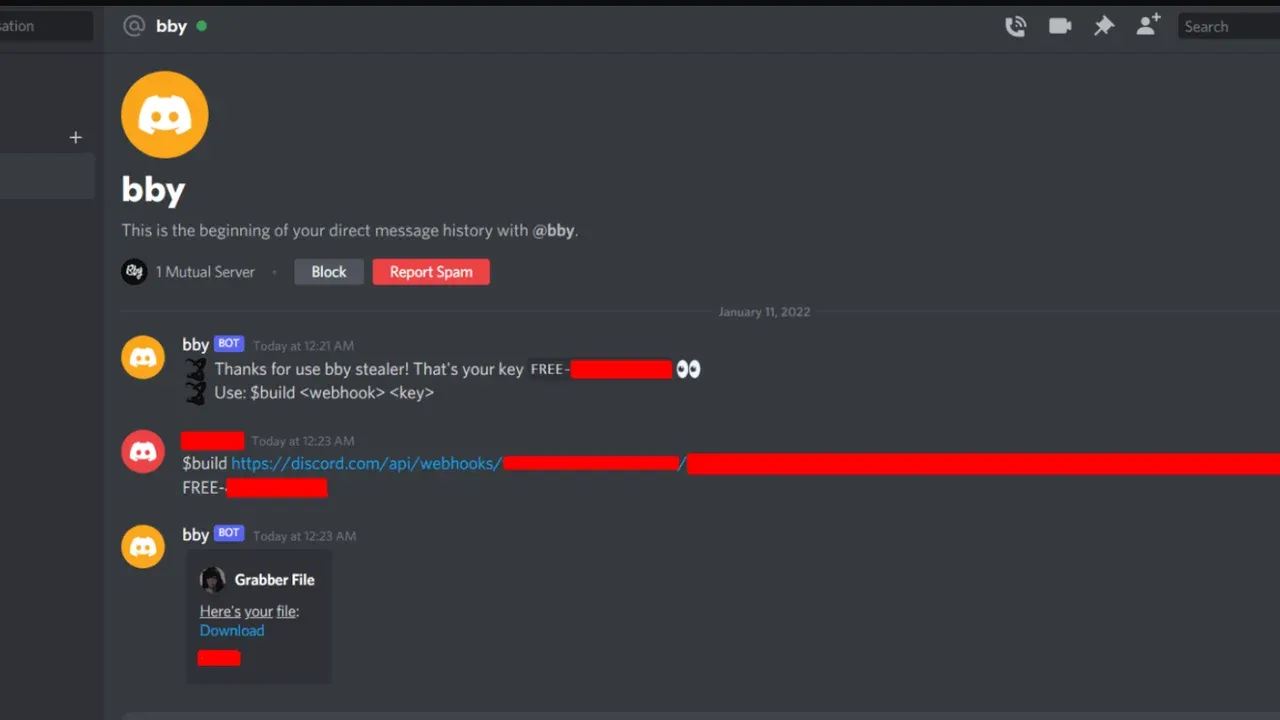
If you accidentally download and run a disguised "cheat," "free Robux generator," or a malicious model file for Roblox Studio, it might contain a stealer program. These programs, like the "Hexon" or "Leet" stealers identified in late 2024, are specifically designed to scrape data from gaming platforms. They scan your computer for browser cookies and active sessions. Once the attacker has your Roblox session cookie, they can inject it into their own browser and instantly access your account—without ever needing your password, bypassing even two-factor authentication (2FA) if you were already logged in. This method highlights why downloading unofficial software is one of the riskiest things you can do.
Fake Developer Tools & Malicious Plugins
Why it's here: This risk specifically targets the creator community. Aspiring developers seeking an edge might look for free scripts, advanced plugins, or "exploit" tools for Roblox Studio. Malicious actors package malware within these tools. When installed, they can log your keystrokes, capture your Roblox Studio login, hijack your published games to run scams on other players, or even use your account's credibility to spread the infected plugin further. It’s a breach that not only loses an account but can destroy a developer's reputation. Always source tools from official channels or vetted community hubs, never from unverified YouTube links or shady forums.
The "Free Robux" Generator Scam
Why it's here: The perennial, ubiquitous scam that preys on a universal desire. These are always fake. Websites or videos promising thousands of free Robux in exchange for completing "human verification" steps are designed for one purpose: to phish your login details. The steps often involve entering your username and password on a fake Roblox page, completing surveys that earn the scammer money, or downloading malware. Robux can only be purchased through official channels or earned through the legitimate Developer Exchange program. Any other method is a scam designed to harvest accounts, which are then stripped of valuable limited items and Robux.
Trade & Trust Scams (The "Middleman" Trick)
Why it's here: This exploits Roblox's social and trading systems directly. A scammer will pose as a trusted middleman for a high-value trade between two players or claim an item is "duped" (duplicated) and can be traded safely if you follow unusual steps. The tactics include:
- Trade URL Manipulation: Pressuring you to trade quickly while using a fake trade screen or a disguised link that sends your items to the scammer's account instead of the intended recipient.
- False Official Claims: Impersonating a Roblox administrator who needs your items to "verify" them or fix a "bug."
- Overpay Scams: Offering a ridiculously valuable item for your lesser one, then canceling at the last second to confuse you into accepting a terrible trade.
These scams rely on social pressure, confusion, and greed. The rule is ironclad: Roblox staff will never participate in or mediate player trades. There is no such thing as a legitimate item duplication method.
The Bottom Line: Awareness is your primary shield. The common thread across all these Roblox scam methods is the exploitation of a user's desire for something more—free currency, better items, or powerful tools. By understanding that phishing seeks your password, cookie logging targets your active session, and "free" offers are always malicious, you can develop the critical skepticism needed to protect your account. The next steps are about building technical defenses to back up that smart judgment.
Social Engineering and Discord-Based Exploits
While many scams happen directly on the Roblox platform, some of the most insidious threats originate on external communication hubs like Discord. Here, scammers use psychological manipulation—social engineering—to trick players into handing over their credentials or installing malware. These attacks are dangerous because they bypass Roblox’s in-game security features entirely, preying on trust, greed, or fear.
Official game artwork
The Discord Nitro Trap
Why it's here: This is the most common and enticing gateway scam targeting Roblox players on Discord. Scammers send direct messages, often from bots or compromised accounts, promising a free Discord Nitro subscription. The message contains a link that appears legitimate but leads to a perfect replica of a Discord or Roblox login page. Once a player enters their username and password, the scammer instantly captures their credentials. What makes this so effective is the high perceived value of Discord Nitro among the gaming community; the desire for a premium perk overrides caution. The takeaway: Discord or Roblox will never ask for your login details via a random DM. Any offer for free Nitro that requires you to "log in" on a new website is a phishing attempt.
Fake Developer Recruitment & Malicious Tools
Why it's here: Scammers exploit the aspirations of players who want to become game developers. They post messages in community servers or send DMs "recruiting" developers for a project. To join, the victim is instructed to download a specific development tool or script from a linked website. This file is often malware disguised as a plugin for Roblox Studio. Once executed, it can install a keylogger, steal Roblox login cookies, or hijack the entire system. This scam works because it targets a player's ambition, using the promise of a creative opportunity to deliver a payload. The takeaway: Only download tools from official sources like the Roblox Creator Hub or verified marketplaces. Legitimate teams won't require you to download unverified executables as a first step.
Session Hijacking via Screen Sharing
Why it's here: This is a sophisticated, multi-step social engineering attack that directly leads to account theft. A scammer will first get a victim falsely banned from a popular Discord server (often by fabricating evidence). Then, posing as a helpful moderator, they contact the victim offering to help reverse the ban. To "verify the victim's identity," the fake moderator asks them to share their screen on Discord. While screen-sharing, the scammer watches as the victim logs into Roblox, capturing their login session cookie. With this cookie, the attacker can hijack the active session, bypassing passwords and even two-factor authentication (2FA) to gain full access to the Roblox account and any stored Robux or limited items. The takeaway: Never share your screen with someone you don't personally know and trust. No legitimate moderator will ever ask for this level of access to "help" you.
Token Grabbing & Fake Verification Bots
Why it's here: This method targets the technical authentication process itself. Scammers invite users to a Discord server that requires "verification" to join. A fake bot (impersonating a popular bot like MEE6) prompts the user to authorize it with their Discord account. The authorization link is a phishing site designed to steal the user's Discord authentication token. This token is a digital key to your account; if stolen, it allows a hacker to log in as you without needing your password or 2FA codes. They can then access any connected accounts or use your trusted identity to scam your friends. The takeaway: Only verify or authorize bots in well-known, official servers. Be extremely wary of new servers demanding verification through unfamiliar links.
The "Friend in Need" Impersonation
Why it's here: This classic social engineering tactic is supercharged on Discord. Scammers hack a Discord account and use it to message the victim's friends list. The message claims to be in urgent need of help—perhaps to verify a new device, recover an account, or receive a temporary code. The message, coming from a trusted friend, pressures the victim to hand over a Roblox account PIN, a 2FA code, or their password. The scam exploits empathy and the instinct to help a friend quickly, bypassing all logical security checks. The takeaway: Always verify urgent requests through a second, separate communication channel (like a text message or a call). A real friend won't mind you double-checking.
In-Game Scams and Malicious Development Tools
In-Game Scams and Malicious Development Tools
The Roblox economy is built on a massive foundation of user-generated content and a complex virtual trading market. While this ecosystem allows for incredible creativity, it also presents unique risks for those who transition from being casual players to active traders or developers.
Limited Items and the Trading System
The Trading System is the primary target for high-level scammers because it involves Limited Items—exclusive virtual assets that have a fixed supply and can be resold for significant amounts of Robux. These items are the "blue chip" stocks of the Roblox world, and scammers frequently use "trade botting" or "poisoned item" scams to exploit them. A "poisoned item" is a Limited that was originally obtained through a compromised account; if you trade for one, even unknowingly, your account could be flagged or banned by Roblox during their automated cleanup of stolen assets. This makes the trading system high-risk for veteran players, as a single bad transaction can lead to the loss of assets that took years to accumulate. Always verify the "Recent Average Price" (RAP) and the owner history of a Limited before finalizing a deal.
Roblox Studio and Malicious Plugins
For those looking to build their own experiences, Roblox Studio is an essential tool, but it is also a gateway for specialized malware. Scammers often upload Malicious Plugins to the Creator Store that appear to offer helpful features, such as "auto-builders" or "lighting enhancers." In reality, these plugins contain hidden "backdoor" scripts or "require()" calls that can hijack your game’s code. These scripts allow the scammer to insert their own advertisements into your game, steal your game’s data, or even prompt players for their passwords using fake in-game GUIs. Unlike standard account phishing, these tools target the developer's intellectual property and the security of their entire player base.
The Adonis Code Hijacking
A specific and dangerous trend in the development community is the hijacking of trusted open-source tools like Adonis, a popular in-game moderation system. Scammers create "forked" or copied versions of these scripts, injecting malicious code into the legitimate-looking framework. Because developers trust the Adonis name, they may install the fake version without auditing the code. This is a "supply chain" style attack where the malicious tool grants the scammer "Super Admin" powers within your game, allowing them to ban players, shut down servers, or redirect users to scam experiences. This highlights why it is critical to only download assets from verified, reputable creators within the Studio ecosystem.
Fake "Trade Checker" Tools
A hybrid scam that bridges the gap between trading and development involves third-party "Trade Checker" or "Value Calculator" tools. Scammers may direct you to a website or ask you to install a browser extension that promises to tell you if a trade is a "Win" or a "Loss." These tools often contain "cookie loggers" that steal your .ROBLOSECURITY cookie—the digital token that keeps you logged into your account. Once a scammer has this, they can bypass your password and 2FA entirely to drain your inventory.
Takeaway: Whether you are trading high-value Limiteds or building the next hit game in Studio, treat every third-party tool and plugin with extreme skepticism. Stick to official Roblox features, audit any scripts you didn't write yourself, and never install external software to "help" with your trades.
Essential Security Settings to Protect Your Account
Insights on protecting your digital gaming identity
Essential Security Settings to Protect Your Account
Think of your Roblox account like a treasure chest. The password is the lock, but anyone with enough time and a lockpick can get through. The settings in this section are the high-tech security system, moat, and guard dogs you need to make your chest virtually impenetrable. After understanding the common scams, social engineering tricks, and malicious tools, it's time to fortify your defenses directly. This is your technical checklist—the non-negotiable safeguards that turn a vulnerable account into a fortress.
1. Two-Factor Authentication (2FA) via Authenticator App
Why it's here: This is the single most important security upgrade you can make. Roblox has fully rolled out Two-Factor Authentication (2FA), and it is a game-changer. While the platform previously offered Two-Step Verification (2SV) via email, 2FA using an authenticator app is categorically more secure. Here’s the critical distinction: if your email account is compromised, a hacker can intercept the verification code sent to it, bypassing your Roblox 2SV entirely. An authenticator app, however, generates a unique, time-based one-time password (TOTP) directly on your device every 30 seconds. This code exists nowhere else and cannot be intercepted in transit. Even if a scammer knows your password, the astronomical odds of guessing a correct, constantly rotating 6-digit code are virtually zero. Recommendation: Go to your Roblox Security Settings, enable 2FA, and choose the "Authenticator App" option. Disable any older email-based 2SV, as using both is unnecessary and the app is superior.
2. Setting a Robust Account PIN
Why it's here: Two-Factor Authentication protects your account from external logins, but what about changes made from within after you're already signed in? This is where the 4-digit Account PIN is your internal security guard. Once set, this PIN is required to change critical account settings, such as your contact email, password, or privacy options. It prevents a sibling, a "friend" using your computer, or even malware that has gained temporary access to your session from locking you out of your own account by altering your recovery options. Think of it as a secondary lock on the door to your account's control panel. Recommendation: Choose a PIN that is not easily guessable (avoid 1234, your birth year, etc.) and do not share it. This is a simple but powerful barrier against unauthorized administrative changes.
3. Choosing the Right Authenticator App (Microsoft, Google, Authy)
Why it's here: Simply knowing you need an authenticator app isn't enough; you need a reliable one. Your research highlights key players. Microsoft Authenticator is often praised for its simplicity, cloud backup/sync across devices, and the ability to add an extra layer of biometric protection (Face ID, Fingerprint). Google Authenticator is a widely trusted, no-frills option. Authy is excellent for its robust desktop and mobile interface and reliable cloud backup. Avoid obscure, ad-filled apps that may compromise your secret keys. The core features to look for are encrypted backups (so you don't lose access if your phone dies) and a reputable developer. Recommendation: Download Microsoft Authenticator or Authy for their balance of security and convenient recovery features. Scan the QR code Roblox provides during 2FA setup, and securely store the backup codes offered.
4. Reviewing Connected Apps & Account Permissions
Why it's here: While not a "setting" in the traditional sense, this is a critical maintenance task that plugs a hidden vulnerability. Over time, you might have granted login access to third-party Roblox-related sites (for item trading, group management, etc.). If any of those sites are compromised, your account could be at risk through those connected permissions. Periodically auditing this list ensures you're not leaving a back door open. Recommendation: Navigate to your Roblox Settings > Security > Connected Apps (or similar). Review the list and revoke access for any website or application you no longer use or recognize. This limits your attack surface.
5. Enabling Account Restrictions (For Younger Players)
Why it's here: This is a premier defensive setting, especially for younger users or those who want a curated experience. Enabling Account Restrictions does two vital things: First, it locks the account's privacy settings to the highest level, preventing contact from unknown users. Second, and most importantly for security, it limits gameplay and access to only those experiences vetted and allowed by Roblox. This creates a massive filter that blocks access to the vast majority of malicious games designed to distribute exploits or phishing links. It is a blunt but incredibly effective tool to preemptively neutralize the threats discussed in the "In-Game Scams" section. Recommendation: For parents managing a child's account or for any player wanting a heavily sanitized experience, turn this on. It's found under Settings > Privacy.
The Takeaway: Security is not a single action but a layered system. Enable 2FA with an authenticator app as your essential outer wall. Set an Account PIN as your internal gatekeeper. Choose a reputable app like Microsoft Authenticator for reliability. Regularly audit connected apps to close hidden passages. And for maximum preemptive defense, don’t overlook the power of Account Restrictions. Configure these five settings, and you’ve moved your account from being a target to being a citadel.
How to Recover and Contact Official Roblox Support
How to Recover and Contact Official Roblox Support
Discovering your account has been compromised is stressful, but panicking is the enemy of recovery. The final and most critical line of defense is Official Roblox Support. While the previous sections focused on prevention, this guide details the official, step-by-step process to regain control if your defenses are breached. Acting methodically and through the correct channels is the difference between a quick recovery and permanent loss.
1. The Immediate First-Action Protocol: Securing Your System
Before you even think about contacting support, you must secure the device you use to access Roblox. Attempting to recover an account from an infected computer is like changing the locks on a house while the burglar is still inside—they’ll just get back in.
Why it's here: This is the non-negotiable first step mandated by Roblox's own support articles. The most common cause of account theft is malware, often disguised as a "free Robux generator" or a useful Chrome extension. If you don't remove this threat, any new password you create will be instantly stolen again. Run a full, deep virus scan with reputable antivirus software, restart your computer, and run a second scan. Furthermore, meticulously review and remove any browser extensions, especially for Chrome, that you did not install from an official store or that you no longer recognize. This cleanup is not a suggestion; it is the foundational step for any successful recovery.
2. The Password Reset: Your Primary Recovery Tool
If you can still access your email or phone number linked to the account, your fastest path back is the "Forgot Password" feature. This is your first official action within Roblox's systems.
Why it's here: This is the official, automated recovery method Roblox provides. Navigate to the Roblox login page and click "Forgot Password or Username?" You’ll be prompted to enter your email address or phone number. Crucially, you must enter the address exactly as it appears on your account (e.g., if you used name.example@gmail.com, you must include the period). An email with a reset link will be sent. If it doesn’t arrive, check your spam folder thoroughly. Once reset, create a completely new, strong password you have never used anywhere else. Do not revert to an old password. If this process works, you have likely stopped the hacker and regained control without needing to wait for support.
3. The Support Ticket: When Automated Recovery Fails
If the hacker has changed your account's email, phone number, or you simply cannot receive the reset codes, you must escalate to Roblox Customer Support via a formal ticket. This is where most users get stuck, but providing the right information is key.
Why it's here: This is your only recourse when locked out. Go to the Roblox Support Form. Select the issue category that best fits, such as "Account Hacked or Can’t Log In." The single most important factor for success is the information you provide in the "Description of issue" field. Be detailed, calm, and factual. Most importantly, you must provide proof of original account ownership. Roblox Support will typically ask for:
- The first email address ever used on the account.
- Billing information: Screenshots of receipts for Robux, Premium, or gift card purchases. This is one of the strongest forms of verification.
- Historical proof: Screenshots or videos of you playing on the account, clearly showing your username and display name from weeks or months prior.
Key Takeaway: Support does not guarantee account restoration, but providing this concrete evidence dramatically increases your chances. According to user reports, providing billing receipts and historical screenshots can lead to a response and resolution within 1-2 days.
4. Managing Expectations: What Support Can and Cannot Do
Contacting support is not a magic wand. Roblox’s official policy is clear, and understanding it will save you frustration.
Why it's here: Setting realistic expectations is crucial. As stated in Roblox's support articles, the company "is under no obligation to assist users whose accounts have been compromised" regarding lost items or currency, unless required by law. They do not guarantee restoration. However, in very limited circumstances, they may offer a one-time recovery of lost inventory or its approximate value. The critical window for this is 30 days from the compromise. Furthermore, Roblox does not support, enforce, or recover items for trades or deals made outside official systems (like Discord). If you traded your limited item for a promise of Robux off-platform, support will not help you. Your best hope in a full hack scenario is account access recovery, not necessarily a full inventory rollback.
5. Post-Recovery Imperative: Locking the Door Forever
Once you regain access, your job is not done. You must immediately fortify your account to prevent a repeat incident.
Why it's here: Recovery is pointless without this final step. Immediately go to Settings > Security and:
- Enable 2-Step Verification (2SV) using an Authenticator App. This is the gold standard. Even if your password is stolen again, the hacker cannot log in without the code from your phone.
- Set up an Account PIN. This prevents anyone from changing your security settings even if they are briefly logged in.
- Verify all contact information. Ensure your email and phone number are correct and secure.
This transforms your recovered account from a vulnerable target into a fortress. The entire recovery process—from virus scan to 2SV setup—is the definitive, official path from victim back to secure player.