How to Understand Robux and the Roblox Virtual Economy
Welcome to the world of Roblox, where creativity and play collide in a massive online universe. But to truly unlock everything this platform offers, you need to understand the fuel that powers its entire ecosystem: Robux. Think of this as your crash course in the Roblox virtual economy, setting you up for success and safety in the sections to come.
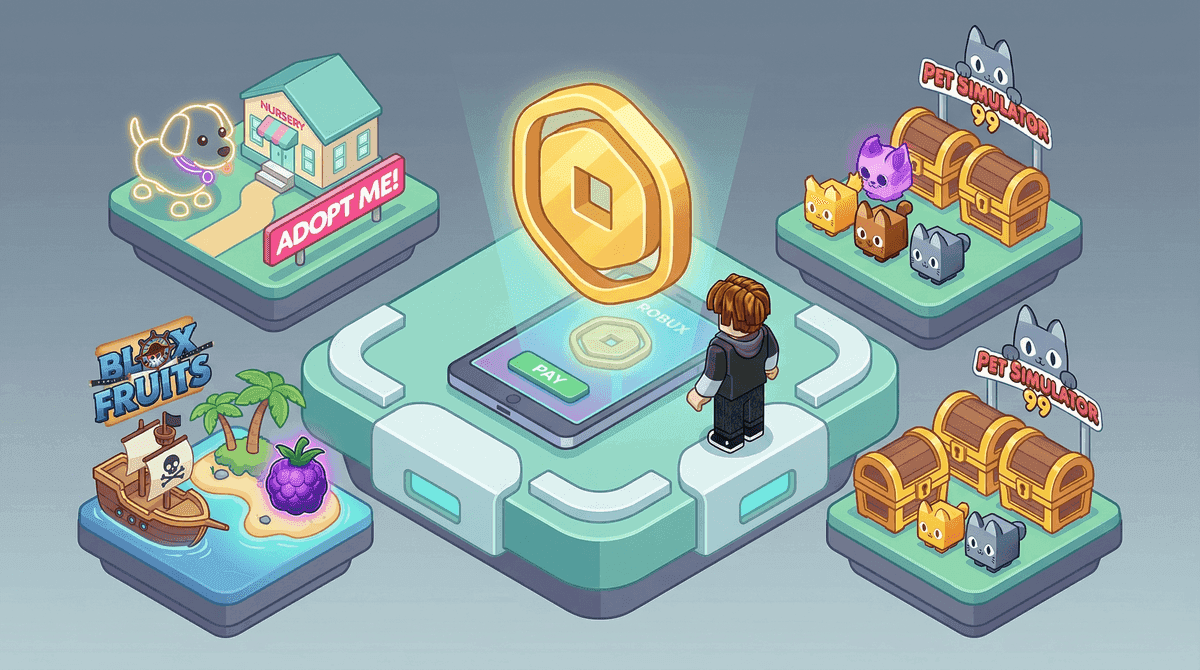
The Roblox economy encompasses everything from simple accessories to complex in-game assets.
At its core, Robux is the proprietary virtual currency that makes the Roblox world go 'round. It's the digital cash you use for everything from a cool new hat for your avatar to exclusive powers in your favorite games. This currency is central to the platform's identity, creating a complex, player-driven economy where digital items can hold real-world value and status.
Remember this golden rule: Robux is a tool, not a goal. It’s meant to enhance your fun and creativity, not become a source of stress or risk.
So, where does Robux actually come from? There are a few official, legitimate channels, and it's crucial to know them to avoid scams. The most direct method is through official acquisition on the platform itself. You can head to the Roblox website or app, click the Buy Robux tab, and purchase packages directly using a credit card, PayPal, or by redeeming an official Roblox gift card. This is the safest and most straightforward way to get Robux.
For players who want a steady stream of currency and extra perks, there's Roblox Premium. This is a monthly subscription you can manage from the Roblox membership page. Subscribers receive a regular Robux allowance each month, along with benefits like the ability to trade items and earn a sales commission on creations. It’s a popular option for dedicated players and aspiring creators.
Finally, for the builders and coders who bring games to life, there’s the Developer Exchange, commonly called DevEx. This isn't for spending—it's for cashing out. Found through the Roblox Create page, DevEx allows eligible creators who have earned a significant amount of Robux through their games and items to exchange them for real-world currency. It’s the program that turns creative passion into tangible rewards, but it comes with strict requirements and tax implications.
Understanding these four pillars—Robux as the currency, buying it directly, subscribing for a regular allowance, and the creator cash-out program—is your foundation. With this knowledge, you're equipped to navigate the marketplace wisely, spot illegitimate "free Robux" schemes from a mile away, and make the most of your Roblox adventure. Let's build on this foundation.
How to Use Robux in the Roblox Catalog and Marketplace
Now that you've got Robux in your account, it’s time to spend it. The Roblox Catalog—accessible from the navigation bar on the main website—is your central hub for avatar customization. This is where your Robux transforms your look and, for many players, your social status. In Roblox, a sharp avatar isn't just for show; it's a key part of your identity within the game.
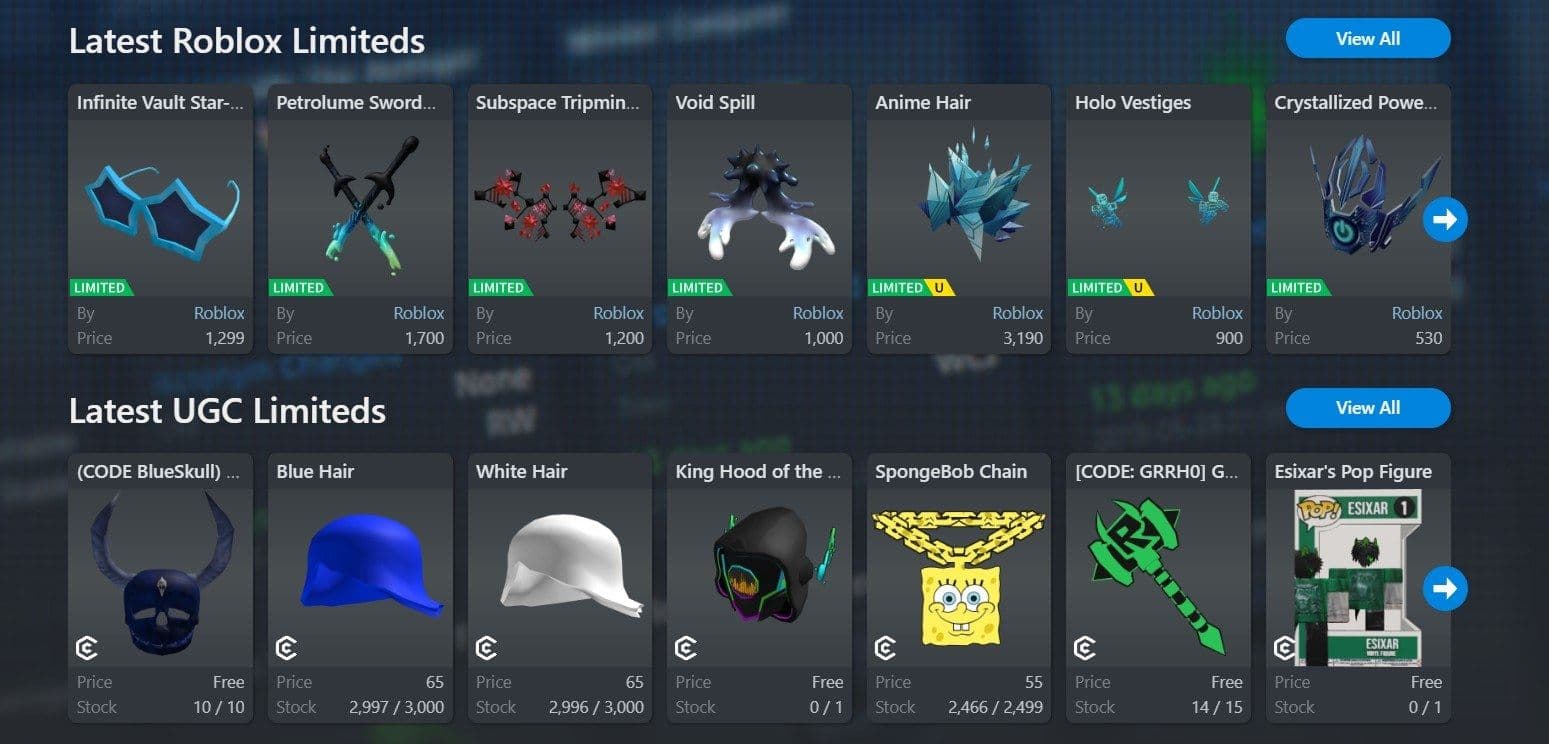
Understanding the Limiteds economy in Roblox.
Your primary spending here will be on clothes, accessories, faces, and gear. But the real economic action happens with a special category: Limiteds. These are items released by Roblox in a fixed quantity. Once they sell out from the official catalog, they can only be bought from other players, often at prices that rise and fall based on demand, rarity, and hype. Think of items like the Dominus hats—they’re not just virtual gear; they’re high-status symbols that signal dedication and taste.
The desire for rare items like a Dominus can feel overwhelming, but it’s a marathon, not a sprint. Start small, learn the market, and build your collection gradually.
This secondary market for Limiteds functions like a mini stock market, and many players engage in a strategy called flipping Limiteds. This involves monitoring price charts on sites like Rolimons to buy low and sell high. You might purchase an item when its Recent Average Price (RAP) dips, hold it as demand grows, and then resell it on the Roblox Catalog for a profit. It requires patience, research, and a Roblox Premium subscription (which is mandatory for trading), but it can turn your avatar investment into a profitable side hustle within the game's economy.
Here’s the trick most guides miss: value isn't just about the listed price. You need to understand why an item is valuable. Is it a classic Limited with nostalgic appeal? A hot new User-Generated Content (UGC) item from a popular creator? Or an exclusive drop from a major Roblox event? Using external tools to check 30-day price graphs helps you avoid buying into artificial hype. Look for steady growth, not sudden spikes that might crash.
⚠️ Watch out: Always, always complete trades within Roblox's official trade window. Scammers frequently try to switch items at the last second. If a deal seems too good to be true, it almost certainly is.
With your Robux, a keen eye on the Roblox Catalog for Limiteds, and a smart strategy for flipping, you're not just spending currency—you're participating in a dynamic virtual economy. Build your drip, build your portfolio, and most importantly, have fun with it.
How to Use Robux for Game Passes and Developer Products
Alright, you've got your Robux and you're ready to spend it. But within Roblox, not all purchases are created equal. Understanding the difference between a Game Pass and a Developer Product is the key to spending your currency wisely and unlocking the best experiences.
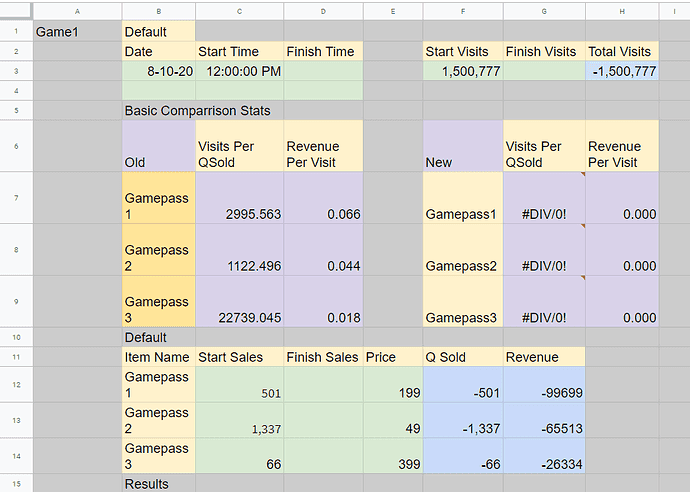
Optimizing game pass prices is key for developers using Robux products.
This is where your Robux transforms from a simple currency into a powerful tool for enhancing specific games. Let's break down what you're actually buying.
Game Passes: Your Permanent Upgrade
Think of a Game Pass as a one-time purchase for a permanent perk. You buy it once from the Roblox > Individual Game Page > Store, and it's yours forever. These are the backbone of meaningful upgrades. Common examples include unlocking a special job role, gaining VIP access to a private area, or purchasing a permanent X2 EXP multiplier that boosts your progress every time you play.
Because they’re tied to your account permanently, they’re a safe, long-term investment. The benefit doesn’t expire after one play session. When you see a Game Pass, you’re buying a lasting piece of that game's world.
Developer Products: The Consumable Boost
In contrast, a Developer Product is a consumable item. You’ll typically buy these through an in-game prompt, and they’re designed to be purchased multiple times. These are your temporary power-ups: a pack of in-game gold, a 30-minute speed boost, or a one-use key to open a special crate.
They’re perfect for a quick leg up when you need it, but remember—once you use it, it's gone, and you’ll need to buy another. This makes them the engine behind many "gacha" or unboxing mechanics.
The Thrill (and Risk) of the Unbox
Speaking of which, the Gacha / Unboxing mechanic is a huge part of many popular Roblox games. You'll find these in in-game shops, where you spend Robux to buy virtual "eggs" or "crates" for a random chance at a rare item—like a Huge Pet in Pet Simulator 99. You press [E] (or the designated button) to buy and open them, chasing that dopamine hit of a legendary drop.
⚠️ Watch out: This mechanic is designed to be exciting, but it works just like a digital slot machine. The "house" (the game) always has the advantage. It’s easy to spend a lot of Robux chasing a rare item you may never get. Set a firm limit before you start clicking.
A Peek Behind the Curtain: How Prices Are Set
Ever wonder why a Game Pass costs 199 Robux instead of 250? There’s often a strategy behind it. Savvy developers use Price Optimization, a data-driven method to set prices for maximum profit. They don't just guess; they run experiments in Roblox > Create > Game Pass settings, changing prices and tracking sales over days to find the "sweet spot" that players are most willing to pay.
This is why you’ll often see prices ending in "9" (like 199, 499)—it’s a bit of number psychology that makes a price feel lower than it is. While you can't control this as a player, knowing it exists helps you see the in-game store for what it is: a carefully crafted marketplace.
Your Takeaway: Use Game Passes for permanent, game-changing benefits you’ll value long-term. Spend on Developer Products and Gacha mechanics sparingly and with a clear budget. With this knowledge, you're not just spending Robux—you're making strategic investments in your fun.
How to Identify 'Free Robux' Scams and Generators
Here’s the trap: you’re scrolling, a friend DMs you a link, and suddenly you’re staring at a page promising you 5,000 free Robux. The desire is real—Robux unlocks so much in the game—but in Roblox, this is the moment where scammers try to turn your excitement against you. Let's break down exactly how these "free Robux" traps work so you can spot them a mile away and keep your account safe.
Understanding how fake verification sites steal Roblox account data.
The "Free Robux" Generator: A Classic Trap
This is the most common scam you'll encounter. It starts on a third-party website that looks slick and professional, often promoted in YouTube videos or Roblox chat spam. You're asked to enter your username and pick a Robux amount, then watch a fake progress bar. The critical hook is the fake 'human verification' step. This is where the scammer makes their money. You'll be asked to complete "quick tasks"—downloading apps, filling out surveys, or signing up for free trials—which generate affiliate revenue for the scammer. You'll get stuck in an endless loop of tasks, and the promised Robux never arrives. The site was never designed to give you anything; it was built to harvest your data or make money off your clicks.
If a site asks for your username and then makes you complete a survey or download an app, close the tab immediately. Legitimate Robux only comes from Roblox itself.
Official-Looking Lies: The Milestone Event & Phishing Pages
Scammers have gotten good at mimicking Roblox's own style. One advanced tactic is the Roblox Milestone Event scam. You might land on a polished web page with official-looking branding that promises something like "5,000 Robux to every player" to celebrate a fake platform anniversary. It looks convincing, but it’s just another funnel pushing you toward those same revenue-generating "verification" offers.
Even more dangerous are phishing login pages. These are pixel-perfect copies of the real Roblox login screen, but they live at fake URLs like ‘robl0x.com’ or ‘roblox-login.com’. The scammer lures you there with a message about a fake Premium trial, an account warning, or a gift from a "friend." If you type your password here, you’ve just handed your account directly to a thief. They don’t need to hack you; you gave them the keys.
The Modern Twist: AI and Fake Proof
In 2026, scammers are using smarter tools to overcome your skepticism. Be extremely wary of AI-generated proof videos on YouTube or TikTok. These feature synthetic voices and fake screen recordings that appear to show a "generator" working flawlessly, adding thousands of Robux to an account. They’re designed to look like legitimate tutorials, but they’re all fabricated. The "proof" is completely fake, and the download link in the description will lead you to malware or a phishing page.
Trust me, if you internalize one rule, it will protect you from 99% of these threats: Robux cannot be generated, given away, or hacked by any external website, app, or person. It only comes through official channels: buying it, earning it via Roblox Premium, or through Roblox's own developer programs. Any other promise is a lie designed to take something from you. Keep that in mind, and you'll navigate Roblox safely.
How to Avoid Advanced Social Engineering and Technical Scams
The scams get more sophisticated from here. In Roblox, once a scammer moves beyond fake websites and into direct messaging or technical traps, the danger level spikes. This is where social engineering—manipulating you into making a mistake—meets technical theft like cookie logging. Trust me, understanding these advanced tactics is your best defense.
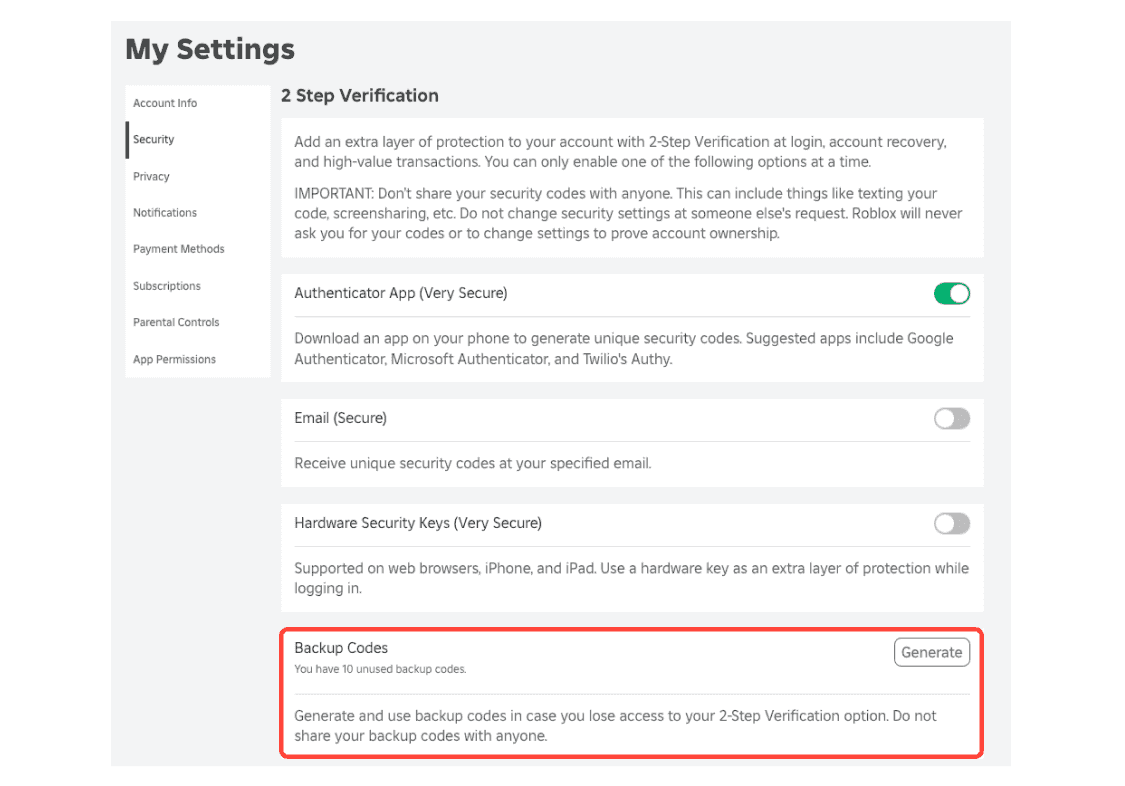
Completing 2FA setup is the first line of defense against unauthorized access.
The Discord Pipeline and Social Engineering Traps
Scammers know that moving the conversation off-platform gives them more control and bypasses Roblox's chat filters. The most dangerous escalation is the 'Check My Profile' Off-Platform Pull. A user will have a link in their Roblox profile bio directing you to Discord, WhatsApp, or Telegram, promising "secret free Robux methods" or "rare items." Once you're on an external app, you're outside Roblox's safety net, making you vulnerable to direct pressure and more complex scams.
⚠️ Watch out: A strict household rule should be: never follow links from Roblox profiles or chats to external platforms. This is a major red flag.
Once on Discord, you might encounter a 'Trade-Up' DM. A stranger, often impersonating a wealthy trader, will offer a seemingly amazing deal for your items. The trade window or final "verification" step is manipulated at the last second, or you're sent a phishing link, resulting in you losing your items or your login credentials.
Another common social trap is the 'I'm a Roblox Developer' Scam. Here, a scammer poses as a developer in an in-game chat, offering you a coveted role like a "tester" or an NPC spot in their game. To "verify" you or grant access, they'll ask for your Roblox login details or a small Robux payment upfront. Remember: real developers never need your password, and you should never pay Robux for a role.
Technical Theft: Cookie Logging and Session Hijacking
This is where scams get technical. Cookie logging (also called beaming) is a method where attackers steal your .ROBLOSECURITY token—a hidden piece of data in your browser that tells Roblox you're already logged in.
Here’s how it usually works: A scammer, often on Discord, will send you a link to a "free model" or "plugin" and ask you to open your browser's Developer Console. They then instruct you to paste a piece of malicious code they provide. This code silently copies your .ROBLOSECURITY cookie and sends it to them. With this token, they can bypass your password and even Two-Step Verification (2FA), instantly hijacking your session and your account.
Never, ever paste code into your browser's Developer Console at someone else's request. Legitimate help never requires this. If someone asks you to do this, they are trying to beam your account.
In-Game Manipulation: The Trust Trade
Some scams don't need external links; they happen entirely within Roblox's trade system. The Trust Trade is a classic. Another player proposes a trade but asks you to send your valuable item first as a "show of trust," promising to send their item right after. Once you hit [A] to confirm and send your item, they vanish, leaving you with nothing. Variations include "doubling" scams or using fake "middlemen."
The rule here is simple: Roblox's official trade window is designed for simultaneous exchange. If a deal requires you to send something outside of that window or first, it's a scam. For younger players, a rule of no trades without parental supervision is a smart safety net.
If you've encountered any of these, don't panic—you're not alone. These are designed to exploit trust and curiosity. By recognizing the shift to off-platform pressure, the technical trick of cookie logging, and the emotional manipulation of trust trades, you're now equipped to spot and stop the most advanced threats in Roblox.
Best Security Setup to Protect Your Roblox Account
Alright, you’ve learned how the scams work—now let’s lock your Roblox account down so tight, scammers bounce right off. Think of this as your digital fortress blueprint.
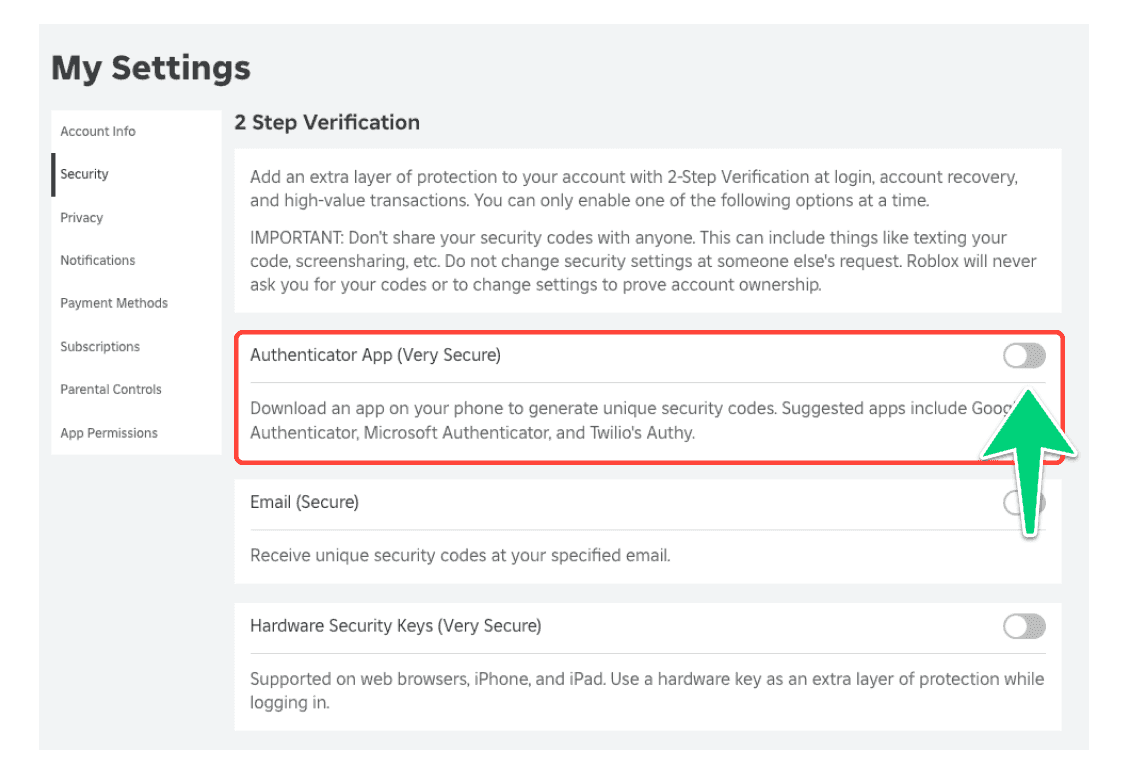
Enable an authenticator app in your Roblox settings to prevent unauthorized logins.
Best Security Setup to Protect Your Roblox Account
This is your proactive playbook. In Roblox, the best defense is a multi-layered setup that stops threats before they ever reach your precious inventory.
First, log into your Roblox account and head straight to Settings > Security. This is your command center. Here, you'll find the two most critical tools: Two-Step Verification (2FA) and an Account PIN. Enable both, right now. Two-Step Verification adds a second code from an authenticator app or email every time you log in from a new device, making it nearly impossible for anyone else to get in, even if they have your password. Right below that, set up a 4-digit Account PIN. This PIN is required to change any sensitive account settings, adding a crucial second lock on the door.
Use an authenticator app (like Google Authenticator or Authy) for your 2FA instead of email. It’s more secure and faster. If your device supports it, consider setting up a passkey through Roblox's Enhanced Protection feature for the strongest, phishing-resistant security available.
Your next habit is URL Verification. Before you ever type your username or password, make it a reflex to look at the browser's address bar. The only site you should log into is roblox.com. Anything else—robl0x.com, free-robux.net, roblox-login.xyz—is a trap. If a link in a Discord DM or a YouTube description looks fishy, don't click it. Copy the text and paste it into a notepad first to see the real destination.
This brings us to the golden rule for younger players (and a great reminder for everyone): the 'Stop, Screenshot, Show' Rule. If you get an unexpected DM, a pop-up about winning a giveaway you didn't enter, or any offer that feels "too good to be true," your immediate response is to Stop. Don't click anything. Screenshot the message. Then Show it to a parent or trusted adult. This simple pause breaks the scammer's cycle of urgency and gives you a moment to think.
Finally, secure the perimeter. Use a strong, unique password just for Roblox—a mix of letters, numbers, and symbols. Never reuse passwords. Remove any saved credit cards from your account to prevent impulsive or unauthorized purchases. In your linked email account, enable 2FA as well, as that’s often the real key to your digital kingdom.
With these layers in place—2FA, an Account PIN, vigilant URL checking, and the 'Stop, Screenshot, Show' reflex—you’ve built a fortress. Scammers will look for easier targets, and your Roblox adventures will be safe and sound.
How to Recover a Compromised Roblox Account
Discovering your Roblox account has been hacked is a gut-punch—your hard-earned items are gone, your avatar is changed, and you're locked out. Don't panic. Acting fast and methodically can help you regain control and minimize the damage. Here’s exactly what to do the moment you suspect a compromise.
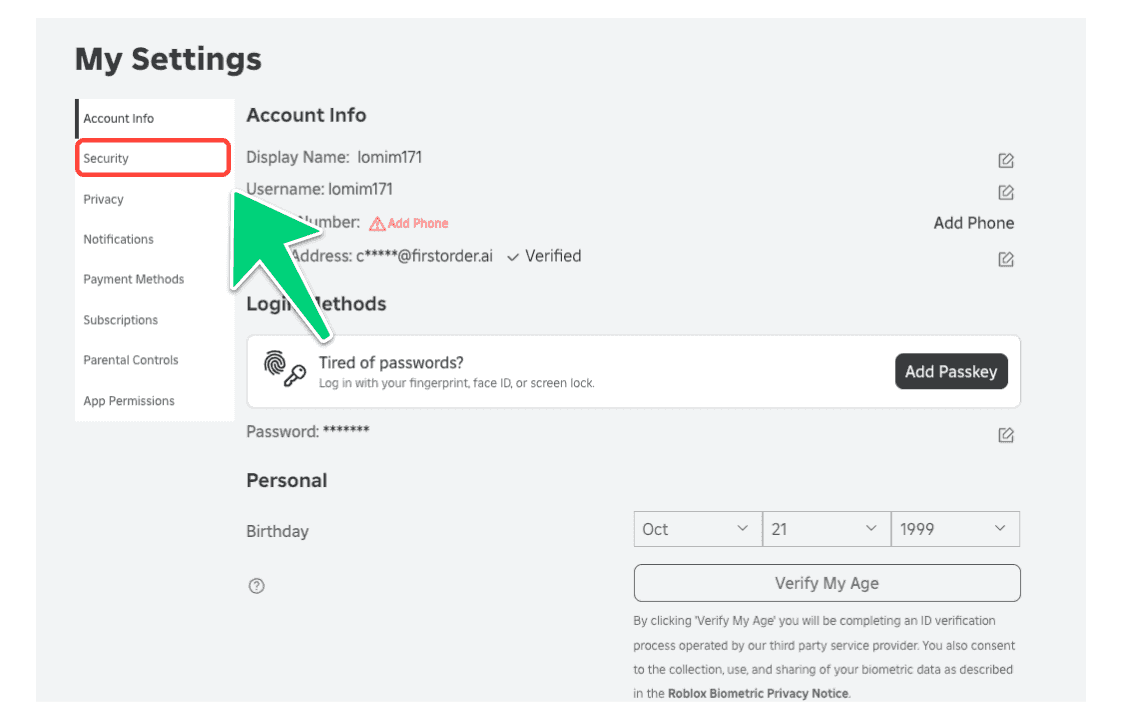
Accessing the Security tab in Roblox settings.
Immediate First Steps to Lock the Door
The first 60 seconds are critical. Your goal is to cut off the attacker's access before they can do more harm. If you can still log in, head straight to Settings > Security and click Sign Out of All Other Sessions. This boots any unauthorized users from your account instantly. Next, change your password to something strong and unique. If you're completely locked out, don't waste time—go to the official Roblox login page and click Forgot Password or Username? to send a reset link to your registered email. Check your spam folder if it doesn’t arrive.
⚠️ Critical Move: Always use the official Roblox Support page at
roblox.com/supportto report the hack. This is the only official channel for requesting help with item restoration or severe account takeover. Be prepared to provide as much detail as possible.
Securing the Aftermath and Seeking Recovery
Once you’ve reclaimed the login, your next job is damage control and prevention. Immediately enable Two-Step Verification in your security settings if it wasn’t already on—this is your best defense against a repeat attack. Then, conduct a thorough audit:
- Check your inventory and transaction history for missing items or unauthorized trades.
- Review your Robux balance and purchase history for any strange activity.
- Remove any suspicious linked devices or browser extensions.
If you entered payment details on a scam site, contact your Bank or card issuer immediately to report unauthorized charges from any 'free trial' subscription traps. They can help dispute the charges and secure your financial accounts.
Roblox Support states you must contact them within 30 days of the compromise to have any chance of recovering lost inventory or its approximate value. The process typically takes 2-5 days, but be aware they are not obligated to restore items.
The Long-Term Mindset: Rebuilding Security
If you’ve been scammed, you’re far from alone—these are sophisticated attacks designed to trick even savvy users. Use this as a hard-learned lesson to build an impenetrable account. Beyond a unique password and 2FA, consider using a password manager and never reuse passwords across sites. Remember, in Roblox, real currency and items only come from official channels; any other shortcut is a trap designed to steal from you.
By following these steps calmly and swiftly, you can shut down the attack, protect what’s left, and build a fortress around your account for the future. You’ve got this.