Roadside vehicle stories in Build 42 are quick tests of judgment, not guaranteed loot piñatas. A construction scene can put useful tools on the ground, a generic construction utility truck can put them in its trunk, and a police shooting blockade can offer firearms only after you accept an armed fight. Other crash scenes are better treated as opportunistic salvage or environmental storytelling. The key is to recognize the roadside scene by its visible signature, use the documented RVS* class ID only to cross-reference it, find the payoff in the right place, and leave when the risk is larger than the need.
The readable wiki and API pages around these scenes are often stamped Build 41, while the current game still exposes the relevant Build 42-era story IDs. That distinction matters: this guide uses the current IDs as its catalogue keys, keeps the supplied chance and footprint values version-qualified, and does not turn variant-specific loot or community observations into universal guarantees.
Build 42 vehicle stories are current IDs on generated road zones.
These roadside scenes are not fixed landmarks with permanent names on the map. They are randomized vehicle stories represented by current RandomizedVehicleStoryBase subclasses and placed through zone and chunk checks, so there is no single “Construction Site location” to drive toward every run. A survivor identifies the scene by its visible signature; the internal RVS* class ID is useful for cross-referencing documentation, not for roadside recognition.
For the current Build 42 catalogue, use the story IDs as the stable identities: RVSConstructionSite, RVSUtilityVehicle, RVSPoliceBlockadeShooting, RVSCarCrash, and RVSCarCrashCorpse. Player-facing lists may use names such as Construction Site, Utility Vehicle, Police Blockade Shooting, Basic Car Crash, and Basic Car Crash Corpse, but those labels are descriptions of the generated scene rather than map coordinates.
Keep the version boundary visible when you cross-reference a scene: readable API and wiki pages are commonly stamped Build 41.65, while the same class IDs remain on the current Build 42-era surface. Use those older pages for scene vocabulary, not as proof that every value or loot detail is current.
Road width is eligibility context, not a promise. Community road documentation describes some highway-only stories as requiring at least eight tiles of asphalt, but an eight-tile road can still produce no story. Identify the roadside scene by its visual signature; use the internal RVS* class ID only to cross-reference documentation, and treat the older page’s version label as part of the evidence you are weighing. Once the class is identified, the first payoff question is whether the manhole-and-cones scene is worth stopping for.
Construction Site is the best low-combat tool stop.
The Construction Site is the roadside scene to recognize when you need tools without volunteering for a major fight. Its signature is a van beside an open sewer or manhole, marked by road cones and watched by construction-worker or foreman zombies. The tools are part of the scene, too: they can be placed on the ground around the vehicle rather than waiting inside a container.
For the current Build 42 framing used here, the story carries chance 3 and a 3x3 footprint. Keep those values version-qualified: the current public API confirms the class and scene, while the accepted handoff supplies these numeric values. They describe how the story is selected, not a promise that every eligible road will produce one.
Approach slowly at the van, confirm the sewer opening and cones, then search the ground before you commit to a fight. Check the area around the manhole and the bushes nearby; player reports describe finding 0–2 tools there, and some reports say both tools can be sledgehammers. That is an anecdotal boundary, not a published loot table, so treat the observation as a reason to search carefully rather than as a guaranteed count or item.
The practical decision is therefore simple: if the worker and foreman zombies can be cleared safely, take the ground-tool opportunity; if they are positioned to turn the stop into a dangerous melee, bypass them or leave after deciding the immediate need is not worth the exposure. Do not open only the vehicle and drive away—the ground around the manhole is the first search target. For sledgehammer locations and the head-and-handle route, use the separate Project Zomboid Build 42 Sledgehammer sourcing guide instead of re-deriving that pool here.
If the scene is a service vehicle rather than roadwork, the next question is whether its livery identifies a genuine tool cache or a different profession's inventory.
Utility Vehicle pays only after you identify the variant
That distinction matters because Utility Vehicle is a service-story family, not a synonym for “construction tools.” The accepted Build 42 handoff gives it chance 7 and an 8x9 footprint; those values describe this catalogue entry, not a guarantee that every service variant carries tools.
The scene can represent generic utility service, McCoy’s, fire, police, ranger, or postal work, with matching outfit zombies and only sometimes tools. Read the livery and the variant before you fight through the scene or open the vehicle. The word Utility tells you which story family you found; it does not tell you which inventory is waiting inside.
For the generic construction variant, the payoff is in the trunk. That is the one Utility Vehicle variant that carries the construction tool pool, so a survivor who identifies that livery has a concrete reason to check the trunk after making the approach safe. This is a different search pattern from Construction Site: its tools are not the ground items around a manhole, and the Construction Site’s anecdotal 0–2 observation does not establish a Utility Vehicle count.
McCoy is the useful comparison. Its vehicle points to carpentry loot rather than the generic construction tool pool, so repeating the Construction Site expectation—or assuming that every service van carries the same tools—can turn a promising stop into a wasted fight. A flat-tire or other service scene is another comparison, with repair equipment and profession-specific vehicle loot; it is not evidence that the Construction Site ground-tool pool applies here.
Do not make a universal construction-cache claim for police, fire, ranger, or postal variants. Their service identity controls the expectation, and the available evidence does not justify treating any of them as generic construction trucks. Identify the variant first, then decide whether its likely profession-specific payoff is worth the zombies and exposure; open the trunk for tools when the generic construction case supports that decision. Once the tool variants are separated, the remaining attractive stop is the one that trades a much clearer combat bill for firearms and ammunition.
Police Blockade Shooting offers guns at a combat cost.
After the tool variants, this is the roadside story whose payoff is most visibly tied to danger. RVSPoliceBlockadeShooting places two police cars with a road barricade, armed police zombies carrying guns and rifles, and nearby corpses. The scene is therefore a combat encounter before it is a vehicle-looting stop: the barricade controls the road, and the armed zombies make the cost of reaching any reward immediate.
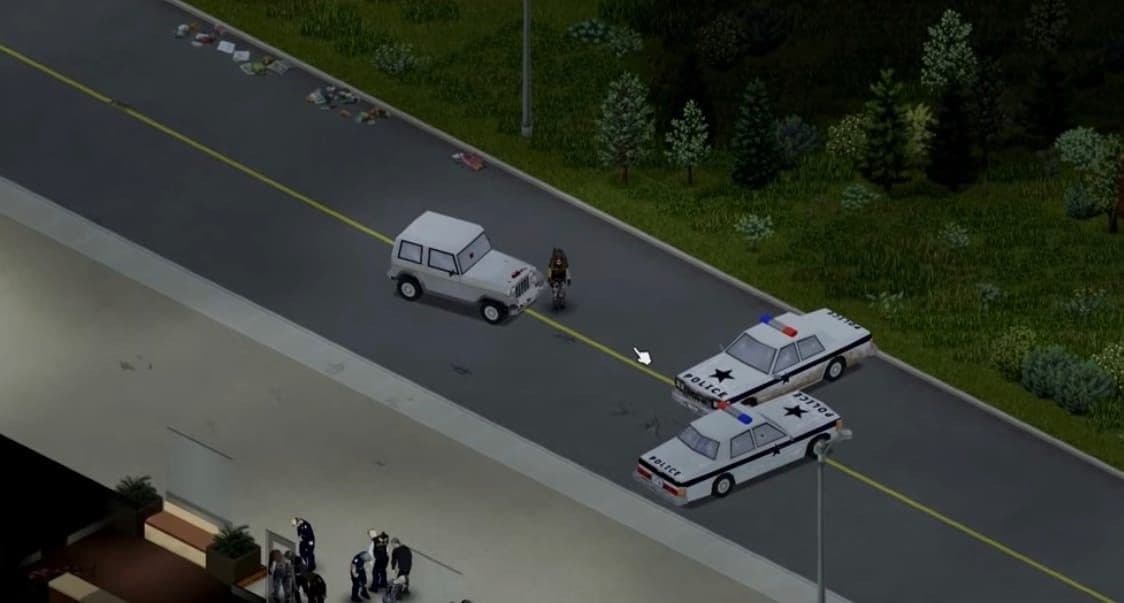
Una barricada policial convierte la parada en una decisión de combate.
Do not confuse it with an ordinary police blockade. Both scenes can read as a police road event, but the ordinary blockade is described as police cars and police zombies without the barricade. The shooting variant is the one marked by the combined barricade-and-armed encounter signature. If you see the police vehicles without that combination, do not automatically assign the firearms opportunity to the scene.
The possible payoff is firearms and ammunition, including the guns and rifles associated with the armed police encounter. The available sources do not publish a fixed quantity of weapons or ammunition, and they do not establish a guaranteed trunk pool. Treat the scene as an opportunity to acquire guns or ammo, not as a container with a known payout or a promise that every visit produces a particular haul.
That uncertainty makes the decision need-based. If firearms or ammunition solve an immediate problem and you can control the approach, the barricade may justify spending ammunition, healing supplies, and combat time. If the fight would cost more than an uncertain firearms haul, keep driving. When the barricade-and-armed signature is absent, evaluate the quieter crash stories on their much narrower salvage and scene value.
A basic crash is a salvage decision, not a loot promise.
The ordinary crash is where a recognizable wreck stops being evidence of a loot table. In the current Build 42 framing, RVSCarCrash is the story ID, but the current public API identifies the class without publishing a scene-specific loot description. You can identify the story; you cannot honestly turn that identification into a promised payout.
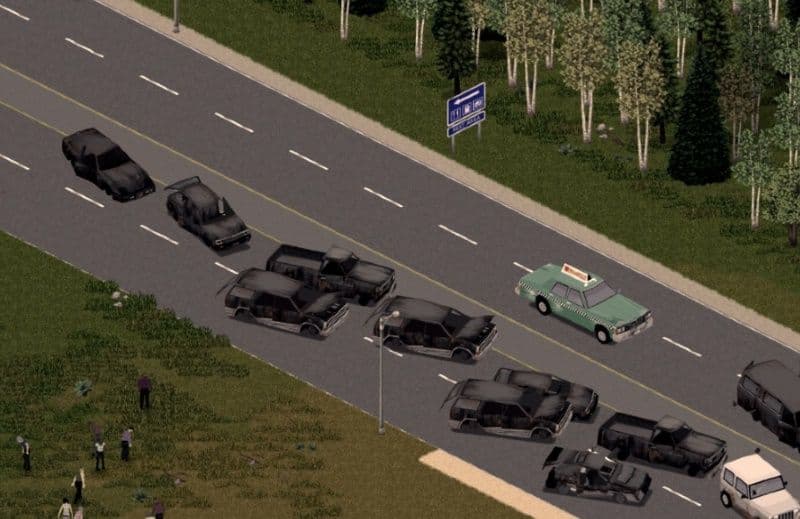
Los accidentes de carretera son una oportunidad de inspección, no una promesa de botín.
Treat the scene as an opportunistic vehicle check. If you encounter it on a route you already need to travel, inspect the vehicle’s condition and any removable parts after weighing the exposure against what salvage would be worth. That is a narrower decision than “this crash has something good in it”: the evidence does not support promising a working car, tools, a corpse, or a fixed payout.
For example, a driver who reaches an ordinary wreck can secure the immediate approach, check whether the vehicle or parts justify the risk, and leave when they do not. The absence of a public current scene-specific description is not proof that every crash is empty; it is the reason not to detour toward RVSCarCrash for rare loot or plan around a guaranteed container. If a corpse is present, evaluate that as the separate crash-corpse class rather than borrowing an unsupported promise from the ordinary crash.
Crash Corpse is mostly a scene and parts check.
RVSCarCrashCorpse adds a readable story signature to an otherwise ordinary-looking wreck: a vehicle stands alone, a corpse lies near the front of it, and a blood trail connects the scene. That combination tells you what you are looking at, but it does not turn the crash into a documented rare-loot cache. The current API establishes the vehicle, front-corpse, and blood-trail details; it does not publish an item pool for the story.
The practical payoff is correspondingly modest. Community road-story documentation describes the matching corpse scene as typically offering ordinary inventory on the corpse and removable parts from the vehicle, with no unusual guaranteed loot. Treat that as a typical community outcome rather than a Build 42 guarantee: the documentation does not map its “hit-person” description directly to the Java ID, and its version boundary is not reliable enough to establish an unchanged current table.
If you are already passing through, secure the approach, check the corpse for ordinary inventory, and inspect the vehicle for parts worth removing. Do not detour toward the blood trail expecting a rare item, a fixed corpse loadout, or a guaranteed vehicle payoff. The corpse is useful environmental storytelling and a low-value opportunistic check; leave when ordinary inventory or salvage does not justify the exposure.
With the five current story classes identified, the remaining decision is whether the supported payoff is enough to stop, inspect, or keep driving.
Stop only when the payoff matches your immediate need.
The practical order is Construction Site, generic construction Utility Vehicle, Police Blockade Shooting, ordinary Crash, then Crash Corpse. That is a risk-adjusted order, not a spawn-frequency table: it weighs where the supported payoff is, how much danger the scene creates, and how much certainty the evidence gives you before you leave the vehicle.
Use this risk-adjusted order:
- Construction Site — stop for the low-combat ground-tool search around the manhole; use the existing Project Zomboid Build 42 Sledgehammer sourcing guide for sledgehammer sourcing.
- Generic construction Utility Vehicle — stop for trunk tools only after confirming the variant; McCoy means carpentry loot.
- Police Blockade Shooting — move it to the top when firearms or ammunition solve an immediate need and you can control the armed encounter; no fixed weapon, ammunition, or trunk count is established.
- Ordinary Crash — inspect only when already passing through; its current public record supports no guaranteed tools, working car, corpse, or fixed payout.
- Crash Corpse — check ordinary corpse inventory or removable parts if the scene is on-route, not as a rare-loot target.
A firearms shortage can override the normal order, but uncertainty cannot turn either crash class into a loot route. For every stop, identify the scene signature, use the documented RVS* class ID only for cross-reference, find the supported payoff location or variant, weigh combat and exposure against the immediate need, and choose stop, inspect, or keep driving.