Standing up a Project Zomboid server is the easy part: one SteamCMD command, one start script, two UDP ports. The part that eats a weekend is that Project Zomboid now runs three incompatible versions of itself under a single Steam entry, and your server, your players and every mod on your list have to agree on which one they are running. When they disagree the game rarely says so out loud.
Build 42.20 went to the public stable branch on 29 July 2026, nineteen months after Build 42 opened as an unstable beta on 17 December 2024. Online multiplayer only returned to Build 42 in 42.13.0, so most established communities spent that entire stretch on Build 41. They now face a save break, a mod format break, and a branch decision that has to be made once, for everybody, before anyone touches a config file. This guide is about that decision and the settings that decide whether the server survives it.
Pick the Branch Before You Pick the Hardware
Steam's Game Versions & Betas list, for both the game and the dedicated server tool, now offers legacy41 (Build 41.78.19), 42.19, and the default public version, which is 42.20. Saves do not cross that list. Build 41 saves will not open in Build 42, and because 42.20 added map content, even Unstable 42.19 saves will not open in 42.20. The Indie Stone published both fallback channels before launch and told Build 41 server owners they could move across ahead of time to minimise the disruption.
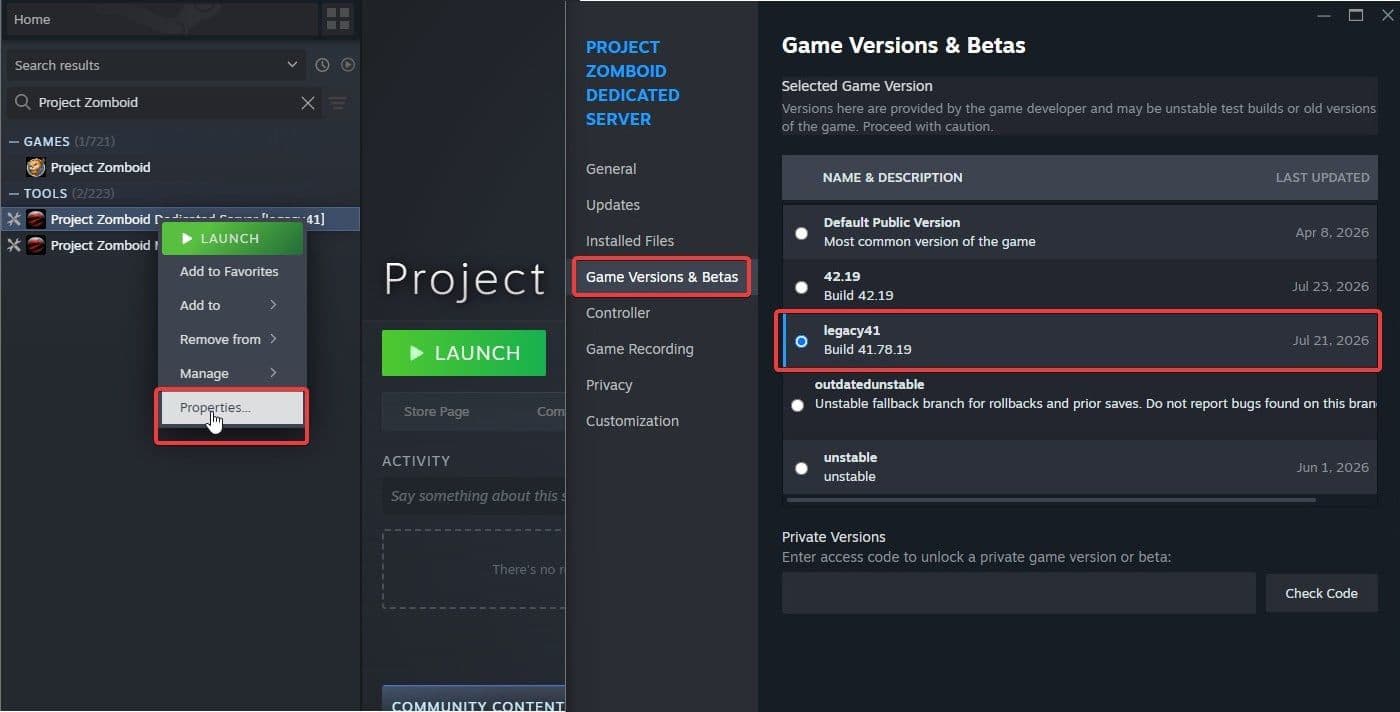
The dedicated server tool carries the same branch list as the game: 42.19, legacy41 and the default public version, 42.20.
If you install through SteamCMD, the branch is an argument:
app_update 380870 -beta legacy41 validate
Drop the -beta flag and you get 42.20. Whichever you pick, every player has to pick the same one on their own copy of the game: right-click Project Zomboid in the Steam library, choose Properties, open Game Versions & Betas, and select the matching channel. This is not optional politeness. DoLuaChecksum=true kicks any client whose game files do not match the server's, so one player left on the default branch cannot join your legacy41 server, and the kick message will not explain that.
There is one honest reason to stay on 41 and one to move. Staying is where your existing world and existing mod list already work, today, with no effort from anyone. Moving is where the reworked Knox Country map, basements, animal husbandry and the overhauled crafting live, and it is the only branch that will be patched: the studio has committed the rest of 2026 to a Build 42 Support Update covering optimisation, additional modding support and the polish that missed the stable cutoff, plus continued multiplayer work. Staying on 41 means choosing to stop receiving fixes.
Your First Boot Will Fail on Memory, Not on Zombies
The dedicated server is Steam app 380870, available as a tool in your library or through SteamCMD with login anonymous. Install it, then do not launch it from Steam — if you do, verify the server files before trying again. Run StartServer64.bat on Windows or start-server.sh on Linux directly.

StartServer64.bat ships with -Xms16g -Xmx16g. On any machine without 16 GB to spare that is an immediate crash with a memory error, and it stops a first boot long before world generation. Open the file, set both values to what the box actually has, and leave the rest of the line alone — the -XX:+UseZGC flag in there is deliberate. Java 21 officially recommends pairing ZGC with -XX:+AlwaysPreTouch if you want one more knob.
On Linux, run the server as an unprivileged user inside tmux so a dropped SSH session does not take the world with it; tmux a brings the console back. A systemd unit works too, although the developers explicitly discourage it. If you go that way, point the unit at a FIFO control socket so systemctl stop can send save, wait, and then quit instead of killing the process mid-write.
The first run prompts on the console for an admin password and creates the admin account from it. When you are scripting the whole thing — containers, systemd, a fresh box each time — -adminusername and -adminpassword set that account up front and skip the prompt.
Ports are 16261/UDP and 16262/UDP. A second instance on the same machine needs its own pair, its own system user and its own -cachedir, or the two servers will fight over one Zomboid folder.
There is one migration failure worth knowing in advance. If a Build 41 server has ever run on this machine, a Build 42 install can die with Assertion Failed: Illegal termination of worker thread. The cause is leftover state. Confirm that steam_appid.txt in the server directory contains exactly one line reading 108600. Then copy the whole Zomboid folder in your user profile somewhere safe, delete the original, start Build 42 once so it rebuilds the folder from scratch, shut it down, and copy your .ini, .lua and Saves back in. The folder Build 42 creates is empty — the world only returns if you put it back.
Four Files Hold the Server, and Only One Is the .ini
Everything configurable lives in %USERPROFILE%\Zomboid\Server on Windows or ~/Zomboid/Server on Linux, in four files named after the server: servertest.ini, servertest_SandboxVars.lua, servertest_spawnpoints.lua and servertest_spawnregions.lua. The .ini holds the non-gameplay rules — ports, players, PVP, safehouses, mods. The SandboxVars file holds the apocalypse itself: zombie population, respawn and migration, per-category loot multipliers, and how many days pass before the water and electricity cut out for good. Spawnpoints and spawnregions decide where new survivors land, which is how you open or close Rosewood or Louisville to newcomers without touching the map.
-servername MyWorld renames all four files and the save folder under Saves/Multiplayer. That is how you run two worlds from one install, and how you retire a world without deleting it.
You can edit the .ini while the server is running. Save the file, then run reloadoptions on the console to push the change out to clients. showoptions prints what the server actually believes, which is not always what you thought you typed. changeoption OptionName "value" applies a single change live; for anything you want to keep, edit the file.
Two values in that file belong in a backup somewhere off the server: ResetID and ServerPlayerID. They are how the server decides that a connecting character belongs to this world, and if they change, every player is forced to create a new one. Do not plan around the built-in escape hatch either — -Dsoftreset does not work as of 42.20.
Turn the backup options on now: BackupsOnStart=true, BackupsOnVersionChange=true, BackupsCount=5 and a non-zero BackupsPeriod cost you disk and nothing else. BackupsOnVersionChange is the one that earns its keep, because it fires at exactly the moment Steam pulls a new build out from under a running world.
Rules Only Exist If They Are in the .ini
A rules post in your Discord is a statement of intent. The .ini is enforcement, and the two should match.
Start with who gets in. Open=true lets anyone connect and create an account; Open=false turns the server into a whitelist and you create accounts by hand with adduser "name" "password". Password= layers a shared secret on top of either. DropOffWhiteListAfterDeath=true is what makes a whitelisted server genuinely permadeath — the account is removed on death instead of respawning as a fresh survivor.
MaxPlayers defaults to 32 and accepts up to 100. The headroom is a trap: past 32 the larger number in the browser costs you map streaming and buys you desync. Admins do not count against the limit.
PVP is two settings rather than one. PVP=true enables it at all. SafetySystem=true then means a player can only be hurt when at least one of the two has toggled into PVP mode, with SafetyToggleTimer and SafetyCooldownTimer stopping anyone from flipping in and out mid-swing. PVPMeleeDamageModifier and PVPFirearmDamageModifier default to 30 and 50 on a scale that runs from 0 to 500, so player-versus-player damage is tuned independently of everything else — lowering them turns fights into beatings rather than executions.
The safehouse block is where a server's social contract actually lives.
| Setting | Default | What it decides |
|---|---|---|
PlayerSafehouse / AdminSafehouse |
false |
Whether players, or only admins, may claim at all |
SafehouseAllowNonResidential |
false |
Whether someone can claim the West Point gun shop |
SafehouseDaySurvivedToClaim |
0 |
In-game days survived before a claim is allowed |
SafeHouseRemovalTime |
144 |
Real-world hours — six days — before an absent member is dropped |
SafehouseAllowTrepass / SafehouseAllowLoot |
true |
Whether non-members can walk in and take things |
DisableSafehouseWhenOwnerConnected |
false |
Set it and a claim becomes offline-only protection |
That last one is worth a second look, because it inverts the feature: a claimed base is sealed while its owner is away and an ordinary building while they are home.
Build 42 layered a faction war on top. Faction=true allows factions at all, gated by FactionDaySurvivedToCreate and FactionPlayersRequiredForTag, while War, WarStartDelay (600 seconds), WarDuration (3600 seconds) and WarSafehouseHitPoints (3) turn a declared conflict into a timed event with a hard limit on safehouse damage, rather than a permanent state of siege.
Moderation is configuration too, and most of it is retroactively useless — switch it on before the argument, not after it.
| Setting | What it does |
|---|---|
ChatStreams |
The list of channels, s,r,a,w,y,sh,f,all; delete a letter and that channel is gone. Drop all and there is no global chat left to moderate |
ChatMessageSlowModeTime / ChatMessageCharacterLimit |
Spam control, defaulting to 3 seconds and 200 characters |
BadWordListFile / BadWordPolicy / BadWordReplacement |
A word list, whether a match bans, kicks, records or mutes, and the text shown instead |
PerkLogs / ClientActionLogs / ClientCommandFilter |
How much of a dispute you can reconstruct a week later |
PVPLogToolChat / PVPLogToolFile |
Whether PVP goes to admin chat, the server log, or both |
Five Access Levels, and Two of Them Can Still Use the Radio
Promotion is one command: /setaccesslevel "PlayerName" "moderator" in chat, or the same thing without the slash on the server console. There are five levels in descending order — admin, moderator, overseer, gm, observer — and none revokes.
The game does not publish a permissions matrix for those five, so read the places it treats them differently instead. The radio is the loudest one. DisableRadioAdmin and DisableRadioGM default to true, while DisableRadioModerator and DisableRadioOverseer default to false. Out of the box your admins and game masters cannot transmit on the in-game radio and your moderators and overseers can — an inversion of the hierarchy that will bite the first time a moderator narrates an event you were staging quietly. DisableRadioInvisible=true closes the same channel for anyone currently using /invisible.
For running events, the tools are /invisible, /noclip, /godmode, /teleportto x,y,z, /createhorde 150 "PlayerName", /chopper and /startstorm. For enforcement they are /kick "name" -r "reason" and /banuser "name" -ip -r "reason", with /banid and /banip when you need to ban a SteamID or an address rather than an account. /players and /servermsg cover the day to day.
RCONPort defaults to 27015 and RCONPassword ships empty. An empty password on a reachable port is unauthenticated console access to your server, which means anyone who finds it can ban your players and quit your world. Set a strong password before the port is ever exposed, and firewall it to the addresses that actually need it.
Anti-cheat is ten separate rules — safety, speed, no-clip, hit, packet exceptions, permissions, XP, safehouse, player and checksum — and each can ban, kick, log, or do nothing. The temptation on a modded server is to disable all ten the first time a mod trips one. Set the offending rule to log instead, use the log to find out which mod is doing it, and leave the other nine alone.
A Build 41 Mod List Loads Nothing on Build 42
Build 42 changed the shape of a mod on disk. Under Build 41 a mod was a folder containing media/, mod.info and poster.png. Under Build 42 that folder instead holds a mandatory common/ directory — which may be empty — plus one or more version directories named for the game build: 42/, 42.1/, and so on, with media/, mod.info and poster.png moved inside the version directory.
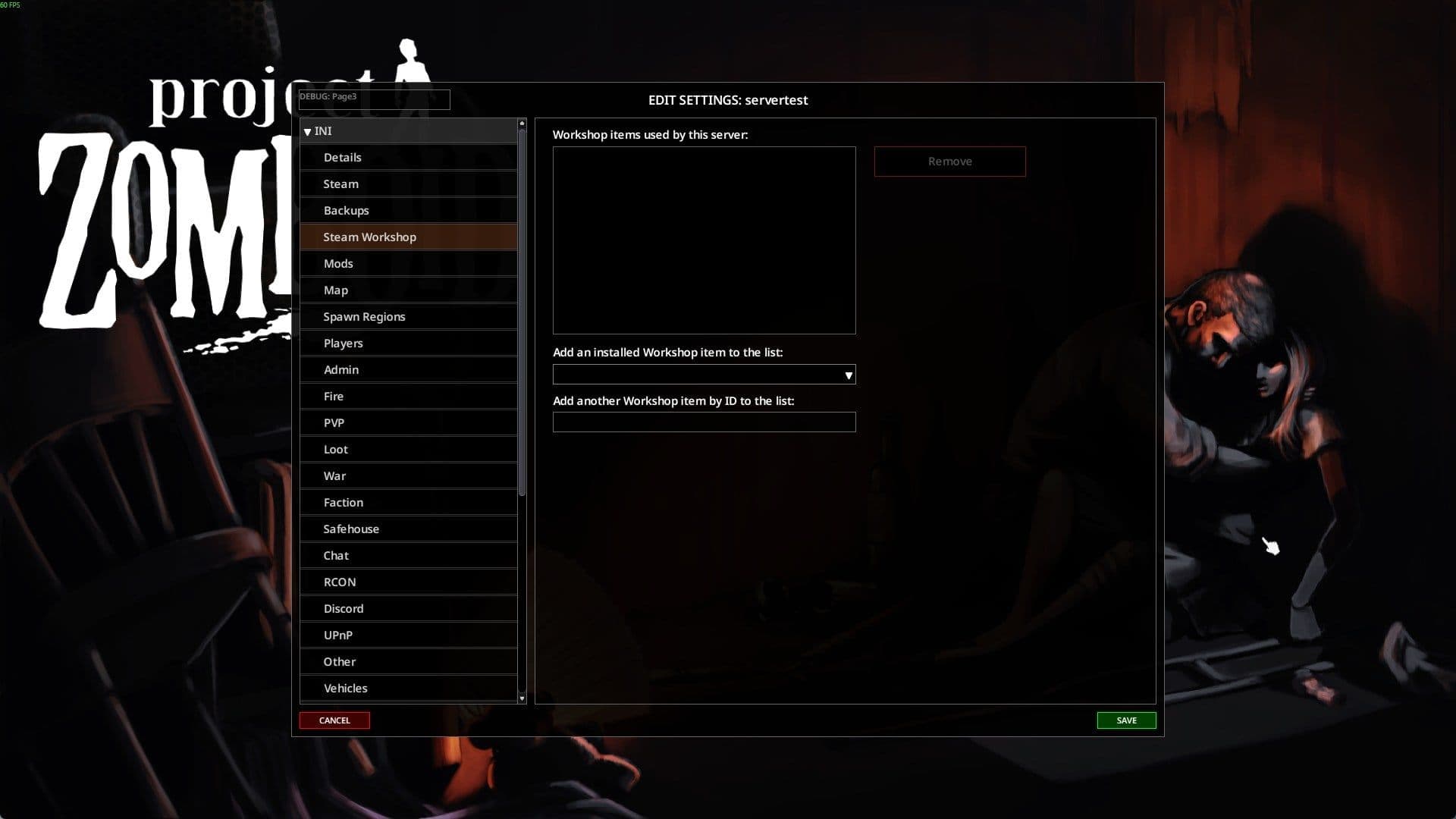
Workshop items can be added by ID from this panel, or written straight into the WorkshopItems line of the .ini.
A mod is only recognised in-game if it has at least one version folder or a common/ folder. An unported Build 41 mod has neither, so Build 42 does not load it, does not warn you and does not list it.
Loading is ordered: common/ first, then the version folder closest to the running build, whose files overwrite the common ones. Folder names ignore the third number — 42.1.5 is treated as 42.1, and a bare 42 as 42.0 — so you do not need a folder per patch. A single mod can carry both layouts at once, because the Build 42 structure sits one level deeper than the Build 41 one and the two stay isolated from each other. That is how a well-maintained Workshop item serves legacy41 and 42.20 from one subscription.
On the server, two settings do different jobs and you need both. WorkshopItems= takes numeric Steam Workshop IDs separated by semicolons and tells the server what to download. Mods= takes loading IDs — the one declared in each mod's own mod.info — and tells the server what to activate. A single Workshop item can contain several mods, which is exactly why the two lists are rarely the same length. Map mods need a third setting, Map=, naming the folder under that mod's media/maps/. Downloads land in Steam/steamapps/workshop/content/108600/<workshopID>, which is where you go to read the mod.info you need — and on Build 42 that file is one directory deeper than you remember, inside the version folder.
Duplicate copies of one mod clash and overwrite each other unpredictably, and ending up with two is easy — a Workshop subscription the server downloads, plus a manual copy dropped into Zomboid/mods/. -modfolders workshop,steam,mods is the lever. Those three are the only mod folders the game reads; the flag declares which of them load and in what order, and anything you leave out is switched off.
Run checkModsNeedUpdate on the console when something breaks overnight; it writes to the log whether a mod has changed underneath you, which is the usual explanation for a server that worked yesterday. And add mods one at a time to a server you have already confirmed boots clean, so a bad addition has exactly one suspect.
Modders have their own version of this problem. 42.20 turned language.txt translation files into JSON language.json and restricted getFileWriter to writing .ini, .cfg, .txt and .log, so a mod that behaved on 42.19 is not automatically fine on 42.20. The Indie Stone has said an extensive modding guide is coming alongside the release of WorldZed, TileZed and its in-house animation tool AnimZed, so the ecosystem should settle. It has not settled yet.
Until it does, do one thing before you paste a single ID into WorkshopItems=: open each mod's folder and look for a 42/ directory or a common/ one. Anything with neither belongs on a legacy41 server, not this one.